
Traffic Engineering
For mission critical applications an end-to-end packet transport service requires, among others, Traffic Engineering in order to provide the transport service for user service packets (e.g. mapping of user service to Pseudo Wire on top of the MPLS-TP tunnels) between two (point to point) or more (multi-point to multi-point) user-network-interfaces (UNI), or service-network-interfaces (SNI).
Mission critical traffic can only fulfill the QoS requirements by setting packet priorities, bandwidth parameters, queuing polices and routing criteria.
For this purpose the FOXMAN‑UN and the MPLS-TP capable nodes provide an appropriate Traffic Engineering.
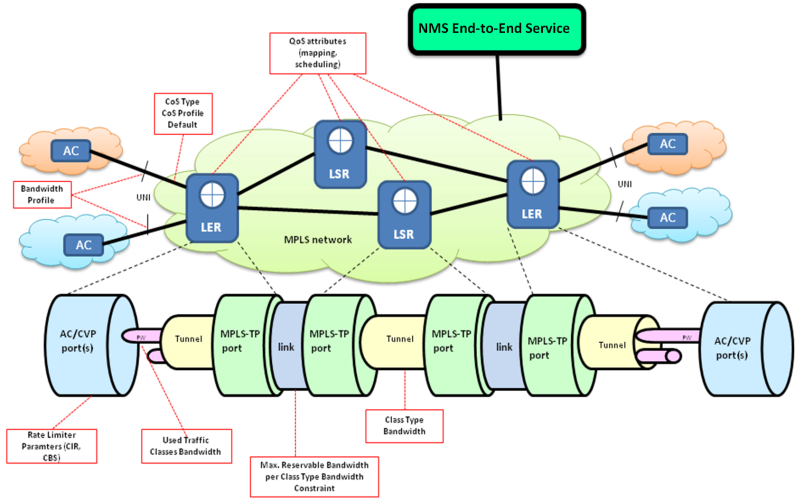
NMS End-to-end Service View
For the implemented MPLS-TP traffic engineering the following subjects are considered:
• Traffic Classification Scheme and Network-wide management of QoS reference tables (see e.g. Manage QoS Reference Tables),
• Mapping of Priorities to Traffic Classes (see e.g. Manage QoS Reference Tables),
• Queue Scheduling Policy (see e.g Class Type (HQoS Class Type Definition)),
• Service Bandwidth Allocation (see e.g. Class Type (HQoS Class Type Definition), Create VPLS, Create VPWS),
• Class Type Concept (see Class Type (HQoS Class Type Definition)),
• Service Profiles (available only with a valid Traffic Engineering license option),
• Network Audit function (see Schedule Network Audit, Schedule Network Alignment, Network Audit Result). The network audit function assures alignment of QoS tables over all nodes in the network, typically performed during the initial installation of the network.
• Backplane audit function (see Schedule Backplane Audit, Backplane Audit Result). This audit function enables the operator to check whether the traffic bandwidth reserved for services and tunnels exceeds the available capacity. In case the sum of the CIR of the services transported on an NE backplane is exceeded, the audit will trigger an alarm.
• A mechanism to indicate to a local craft terminal (FOXCST) user that a node underlying Traffic Engineering is managed by ENP, and that changing the configuration on the node could break up data consistency between the network element and the network management system. All nodes included in the ENP Domain are subject to this mechanism.
Traffic Engineering includes all of the above items. During the Traffic Engineering setup the following activities are recommended:
• Define a traffic classification scheme: define how the user traffic (e.g. incoming traffic at the UNI) is classified to a distinct traffic class. The traffic class is derived either from the packets PCP, DSCP or EXP value, or from the default priority assigned by the management. The traffic class is used to define the queue in which a packet is mapped at the egress port, and to set the priority (EXP) in the MPLS-TP packet header (E-LSP), used in the next MPLS-TP node for the Traffic Class selection.
QoS reference tables defined in at least one node via the FOXCST can be uploaded to the FOXMAN‑UN and can be used/downloaded to other nodes (see Manage QoS Reference Tables).
• Define the queue scheduling via FOXCST by configuring up to 5 scheduling profiles. Define a QoS scheduling profile assignment (1…5) on each egress port.
It is required that the scheduling algorithm – Strict Priority (SP) or Weighted Round Robin (WRR) and the assignment of the profiles’ traffic class at the ports are kept consistent in the network.
For mission critical traffic a strict priority queuing scheme shall be used, whereas a weighted queuing can be applied for non-mission critical traffic.
• Assign bandwidths to services. For mission critical services no bandwidth over-subscription is acceptable.
• Define Class Types (see Class Type (HQoS Class Type Definition)). A sample Class Types concept could look as follows:
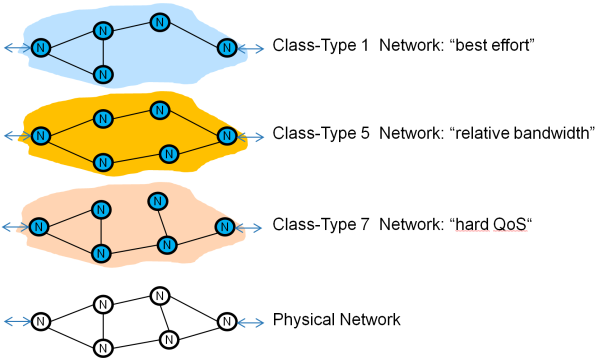
Sample Class Type Concept
For the initial deployment, you may use a traffic model based on two Class Types; one for Mission Critical services (e.g. hard QoS) and one for Non Mission Critical services (best effort). However, when required by the traffic model, additional Class Types are configured.
An output queue scheduler also supports the use of Traffic Classes within the Class Type, as shown in the following sample. In this figure, CT7 has the highest priority (only traffic class 6), the CT6 supports two traffic classes (5 and 4) in a WRR mode. The CT5 supports traffic class 0, best effort mode.
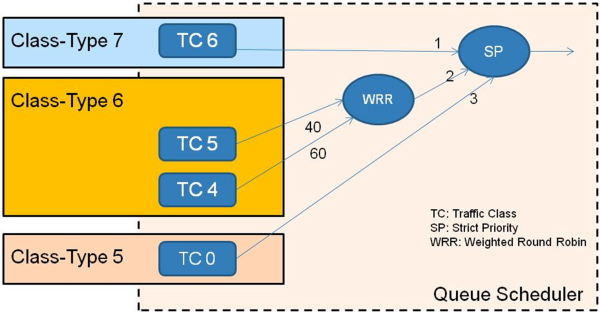
Sample Use of Class Types and QoS Scheduling
In order to have a fair setup in the above example, the CT7 and CT6 have to support bandwidth constrains (policing) and be subject to the Admission Control calculations. Furthermore the Queue Buffers allocated to each traffic class must be dimensioned in an optimal way for this setup. The Class Type 0 shall be reserved for services which are not allocated to a particular Class Type and for the case when a system release is upgraded from prior to the introduction of the Class Type.
• Create Service Profiles. A Service Profile – provided you have acquired a Traffic Engineering license option – is a mandatory requirement for creating services. Service Profiles can be created for VPLS services, and for VPWS services. In any case a valid Class Type (HQoS Class Type Definition) is required for this (also see previous bullet point).

Please note:
The FOX61x supports up to 5 scheduling profiles. The assignment of a scheduling profile to a port is done by the scheduling profile index configured for each port.
For the MPLS-TP network it is required that all nodes have a common definition of the scheduling profile. Adding a new Class Type would in most cases also require a change to the scheduling profile definition.
For the link bandwidth calculation and management the “Russian Dolls” model according to RFC 4127 is implemented. The formula used for bandwidth calculations can be generalized to 8 active Class Types (CTs) and expressed as follows:
"Unreserved TE-Class [i]" =
MIN[
[BCc-SUM(Reserved(CTb,q))] for q≤p and c≤b≤7,
[BC(c-1)-SUM(Reserved(CTb,q))] for q≤p and (c-1)≤b ≤7,
…
[BC0-SUM(Reserved(CTb,q))] for q≤p and 0≤b≤7,
]
where:
TE-Class [i] <--> <CTc, preemption p>
in the configured TE-Class mapping.