
Manage QoS Reference Tables
This dialog is called from the ENP menu “Tools – Basic TE Configuration – Manage Reference Data…”. It is available only for users with the TE option enabled.
Purpose
The main purpose of this feature is to manage and provide specific QoS reference tables over the ENP controlled network. This is to assure consistent QoS settings in the network.
Displays QoS reference tables available on a selected NE.
Allows you to upload selected QoS reference tables from the NE.
Allows you to export and import QoS reference tables.
Displays the QoS reference table details from the NE such as:
− Reference Table name,
− Source NE,
− Last Update (date and time),
− ESW Version (of the unit providing the table),
− Interface Table Name (SNMP name),
− Database Table Name (SNMP name),
− Status
Dialog image
Manage QoS Reference Tables
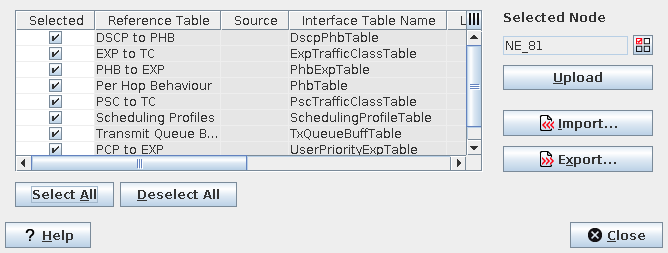
Mandatory entries
Not applicable.
Optional entries
An NE should be selected in order to upload any QoS reference tables.
Informational content
Selected | Marked reference tables are being updated/processed when one of the command buttons is pressed. Use the “Select All” or “Deselect All” buttons for all items. |
Reference Table | Shows the type of reference table available on the NE. |
Source | Shows the name of the NE as selected in the “Selected Node” dialog. |
ESW Version | Shows the ESW name and version of the unit providing the table. |
Interface Table Name | Shows the NE SNMP interface table name. |
Database Table Name | Shows the NE SNMP database table name. |
Latest Update | Shows date and time of the last update of the related reference table. |
Status | Shows the execution status of the upload or download action. |
Controls (buttons, menu items, etc.)
Select Node
Selected Node |  | Calls the Select Node dialog to select one of the ENP NEs. |
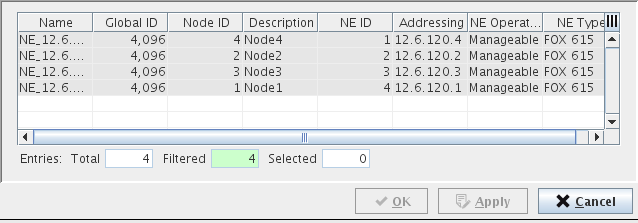
General
Select All | Selects all Items in the list. |
Deselect All | Deselects all items in the list. |
Upload | Upload reference tables from the selected node. |
Import… | Import reference tables from a file. |
Export… | Export selected reference tables to a file. |
? Help | Calls the help viewer and opens this page. |
Close | Closes the dialog. |
Related dialogs / windows