
Schedule Network Alignment
This dialog is called from the ENP menu “Tools – Basic TE Configuration – Schedule Network Alignment…”.
Purpose
The main purpose of this feature is to schedule the alignment of QoS reference tables throughout the network. The alignment of NEs with the set of reference tables stored in the NEM database.
Dialog image
Schedule Network Alignment
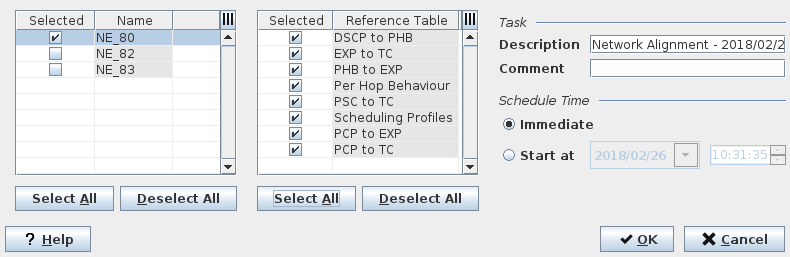
Mandatory entries
Select at least one NE.
Select at least one Reference Table.
Optional entries
Several or all NEs can be selected.
Several or all Reference Tables can be selected.
Task Description
Task Comment
Schedule Time
Informational content
List of NEs
Selected | Mark a checkbox to select an NE. Any listed NE can be selected. |
List of Reference Tables
Selected | Mark a checkbox to select a Reference Table. This requires that Reference Tables have been imported at least once. Any listed Reference Table can be selected. |
Task
Description | Enter a description for the Network Alignment task. This entry is optional. |
Comment | Enter a comment for the Network Alignment task. This entry is optional. |
Schedule Time
Immediate | Select this option to execute the alignment immediately upon clicking “Schedule Alignment”. |
Start at | Select this option to execute the alignment at a specific date and time. Select the date from the calendar and enter the time in the appropriate fields. |
Controls (buttons, menu items, etc.)
Select All | Selects all Items in the list. Applies to listed NEs or to listed Reference Tables. |
Deselect All | De-selects all items in the list. Applies to listed NEs or to listed Reference Tables. |
? Help | Calls the help viewer and opens this page. |
OK | Starts the alignment task and closes the dialog. |
Cancel | Closes the dialog without scheduling the network alignment. |
Related dialogs / windows