
Service Profile
Purpose
The service profile includes a set of parameters which are applied when a service is created and deployed with the ENP.

Please note:
The “Service Profile” tab is only available if you have purchased a TE service profile license option.
Before Service Profiles are edited it is required that the Class Type (HQoS Class Type Definition)s are set according to the Traffic Engineering requirements for the network (Service Profiles are using the reference to the Class Type (HQoS Class Type Definition)s).
Service Profiles can be exported/imported to/from XML files. These files are signed and cannot be modified. Only users with the Traffic Engineering capabilities (license option required) are enabled to create Service Profiles within the Service Profile menu.
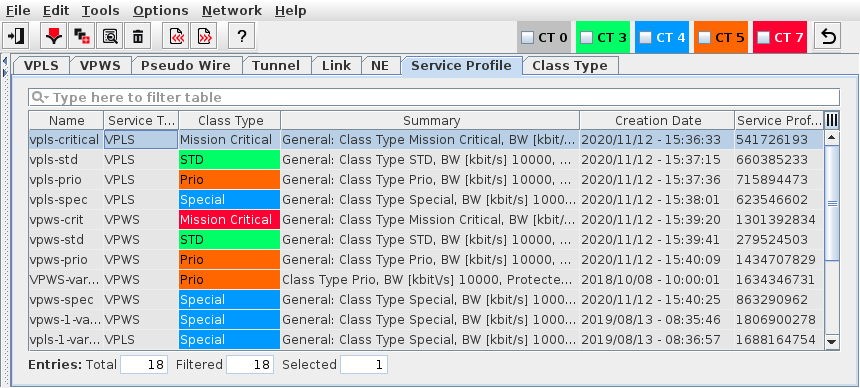
Displays the existing service profiles.
Allows you to create, delete, import, and export service profiles.
Allows you to create service profiles based on an existing service profile.
Displays the service profile details such as:
− Name,
− Description,
− Service Type,
− Summary,
− Creation Date.
Entries in the Service Profile table are filtered with the Class Type Filter on the left hand side (see ENP Main Window).
Dialog image
ENP – Service Profile
Mandatory entries
Not applicable.
Optional entries
The creation of service profiles is optional; however for controlled Class of Service management the use of service profiles is strongly recommended.
Informational content
Name | The specified Name for the service profile. |
Description | The configured description of the service profile. |
Service Type | The service type, VPLS or VPWS. |
Class Type | Class Type as defined via the Class Type (HQoS Class Type Definition) dialog. |
Summary | A summary of the profile settings. |
Creation Date | The date and time when the profile was created. |
Service Profile Id | A unique ID that has been assigned automatically to the service profile. |
Controls (buttons, menu items, etc.)
Edit
Create Service Profile… |  | Calls the Create Service Profile dialog. |
Create Service Profile Based on… [an existing Service Profile] |  | Calls the Create Service Profile dialog for creation of a new Service Profile based on the currently selected Service Profile. Note: This button is only active while one existing service profile is selected. |
Details Service Profile… |  | Calls the Service Profile Details dialog. Note: This button is only active while one existing service profile is selected. |
Delete Service Profile… |  | Deletes the selected service profile. This action needs to be confirmed. Note: This button is only active while one existing service profile is selected. |
Import Service Profile(s)… |  | Imports one or several service profiles from the file system. This action opens a dialog to select XML files from a file system. Usually Service profiles that have been exported before can be imported with this dialog option. While importing from files that include several service profiles, each of the profiles can be selected or deselected individually for import. |
Export Service Profile(s)… |  | Exports the currently selected service profile(s). At least one service profile needs to be selected. This action opens a dialog to specify a file name and location for the service profile(s) to be stored. When several service profiles are selected in the list, they are exported into a single XML file. |
Tools
Edit Class Types | | Calls the Class Type (HQoS Class Type Definition) dialog. |
Context Menu
The context menu options that are available depend on the number of service profiles that are currently selected in the list:
− with no Service Profile selected, the “Create” and “Import” context menu options are available;
− with one Service Profile selected, the “Create”, “Details”, “Delete”, and “Export” context menu options are available;
− with two or more Service Profiles selected, only the “Export” context menu option is available.
Related dialogs / windows