
Backplane Audit Result
This dialog is called from the ENP menu “Tools – Basic TE Configuration – Show Backplane Audit Result…”.
Purpose
The main purpose of this feature is to display current audit results from the alignment of QoS reference tables of backplane ports over several nodes throughout the network.
The dialog also allows you to export backplane audit reports to a CSV file.
Dialog image
Backplane Audit Result
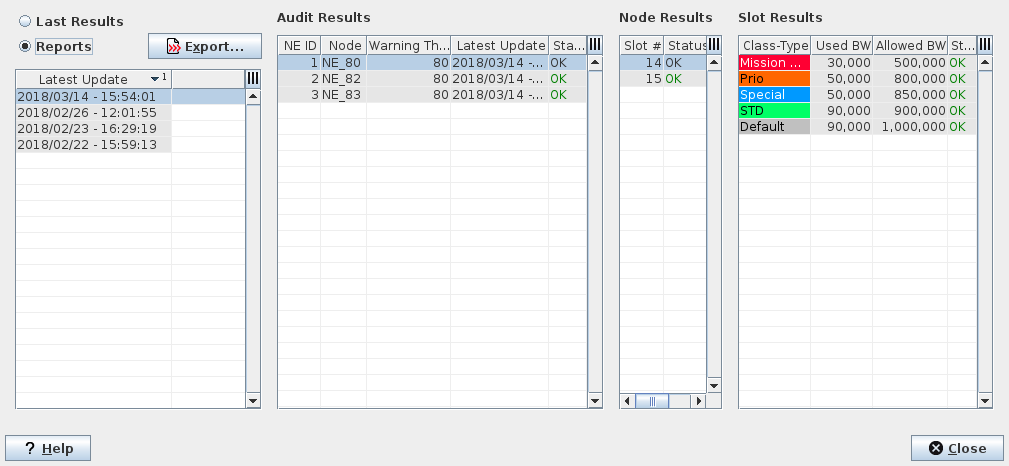
Mandatory entries
Choose whether to display last audit results, or to display reports for export purposes. The selection is done via radio buttons. You need to select either “Last Results” or “Reports”.
• When choosing “Last Results”, only node results and table results are shown.
• When choosing “Reports”, a list of updates (reports) is shown. You can select one of these reports for export to a CSV file.
Optional entries
A node should be selected to display the backplane related node results. A node result (slot) should be selected to display the related slot results.
Informational content
List of Reports (only available when the “Reports” radio button is selected)
Latest Update | Date and time of the recorded audit. |
List of Audit Results
NE ID | ID of the node within the audit function. |
Node | Name of the audited NE. |
Warning Threshold | Threshold set for the backplane audit (see Schedule Backplane Audit). |
Latest Update | Date and time of the latest update of the reference tables for the respective NE. |
Status | Alignment status of the respective NE. The status can be “OK”, “Warning” or “Error”. |
List of Node Results
Slot # | Shows the physical slot no. in the selected node. |
Unit | Name of the unit. |
Status | Status of the respective slot in the selected NE. The status can be “OK”, “Warning” or “Error”. - OK: The used bandwidth does not exceed the allowed bandwidth warning threshold set for the backplane audit. - Warning: The used bandwidth exceeds the warning threshold set for the backplane audit. - Error: The audit has returned an error. |
List of Slot Results
Class Type | The configured Class Types in the selected slot. |
Used BW | The used bandwidth of the respective Class Type. |
Allowed BW | The allowed bandwidth of the respective Class Type. |
Status | Status of the respective bandwidth assignment and usage. The status can be “OK”, “Warning” or “Error”. |
Controls (buttons, menu items, etc.)
Last Results | Select this button to get a list of audit results for each of the audited nodes. |
Reports | Select this button to get a list of Report updates of which the selected report can be exported to a file. |
Export… | Command to export the selected contents to a file. |
? Help | Calls the help viewer and opens this page. |
Close | Closes the dialog. |
Related dialogs / windows