
VPWS
Purpose
Displays all the existing VPWS services.
Allows you to create, modify, see details, deploy or delete VPWS services.
Entries in the VPWS table are filtered with the Class Type Filter on the left hand side (see ENP Main Window).
Dialog image
ENP – VPWS
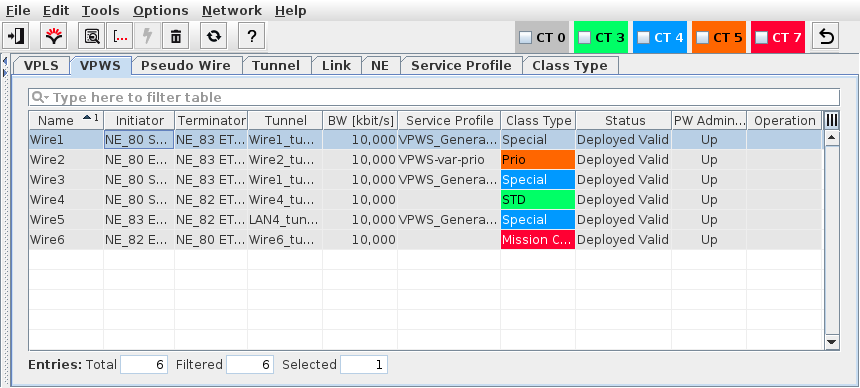
Mandatory entries
Not applicable.
Optional entries
Not applicable.
Informational content
Name | The specified Name of the service. |
Description | The specified Description of the service. |
Initiator | The ingress Label Edge Router (LER) |
Terminator | The egress LER |
Tunnel | The name of the tunnel used for the service. |
BW [kbit/s] | The allocated service bandwidth. |
Service Profile | The Service Profile that was used to create the VPLS. |
Class Type | The Class Type that was used to create the VPLS. |
Class Type Id | The ID of the Class Type assigned to the service. This parameter is hidden by default. It can be made visible via the table header context menu. |
Status | The Pseudo Wire status: - Deploying/Removing: Display the Progress bar Indicating the current progress of deploying or deleting the selected Service(s). - Deployed Valid: The Service (both Pseudo Wire endpoints) is deployed to the MPLS-TP nodes. - Deployed Invalid: One side of the Pseudo Wire is missing or was not correctly deployed. It is saved in the FOXMAN‑UN database and is deployed to the nodes. - Saved OK: The Service, Pseudo Wire are saved in the database but not yet deployed in the MPLS-TP nodes. |
PW Admin State | The current Pseudo Wire administrative status (Up/Partially Down/Down). During the transition between up and down the status may be shown as “Partially Down” or “Invalid” until both ends are done. |
Supervision | Service Supervision status, - Running: this VPWS is supervised. Supervision can be paused or disabled via the “Supervision ► Pause” or “Supervision ► Disable…” commands in the context menu or the “Edit” menu. - Paused: service supervision is paused on this VPWS. It can be resumed via the “Supervision ► Resume” command in the context menu or the “Edit” menu. - Disabled: service supervision is disabled on this VPWS. It can be enabled via the “Supervision ► Enable…” command in the context menu or the “Edit” menu. |
Superv. Oper State | The operational state (up, down) of the service supervision on this VPWS. This field is empty when service supervision is disabled. |
Fault State | The highest active fault state of the VPWS. |
PW Control Word | The setting (Enabled, Disabled) for the PW Control Word of the selected VPWS. |
LLF | The Link Loss Forwarding state (On, Off). |
Operation | The operation status during deployment or removal: - Deploy Pending, - Deploy Executing, - Remove Pending, - Remove Executing, - Success. |
Controls (buttons, menu items, etc.)
Edit (also via Context Menu)
 | Calls the Create Service Wizard. | |
Details VPWS… |  | Calls the VPWS Details dialog in view mode. Displays the whole VPWS in one view (The Defined Service, Pseudo Wire, and Selected Tunnel). From the Details view, the possible actions are: - Deploy: Deploys the Service to the MPLS-TP nodes. - Delete: Deletes the Service. - Close: Closes the dialog. For more information refer to VPWS Details section. |
Show Status Reason… | Opens a window with additional information on the most probable reason for an unaligned or invalid status if applicable to the selected item. | |
Modify VPWS… |  | Calls the VPWS edit dialog. |
Deploy VPWS |  | Deploys the currently selected Service(s) to the nodes Note: The progress of the Service(s) deployment can be monitored in the “Status” column. |
Align VPWS… | Aligns the Service such that any misalignment between the ENP database configuration and the Service present in the network is corrected. | |
Delete VPWS… |  | Deletes the currently selected Service(s) Note: The progress of the Service(s) deployment can be monitored in the “Status” column. |
Synchronize VPWS |  | Synchronizes the selected VPWS with the configuration present in the network (i.e. present on the NEs included in the service). |
Open Initiator | Open the Initiator NE in the local craft terminal (FOXCST). For this purpose you need to select a user class in the sub-menu. | |
Open Terminator | Open the Terminator NE in the local craft terminal (FOXCST). For this purpose you need to select a user class in the sub-menu. | |
Open in Service Supervision… | Opens the service in a filtered view of the Service Supervision dialog. | |
PW Admin State | - Up: Sets the administrative state of the Pseudo Wires used for this service to “up”. - Down: Sets the administrative state of the Pseudo Wires used for this service to “down”. | |
Create a new dashboard in the metrics database application for the selected service. This will execute a script on the server to create a performance monitor. The dashboard with the given “Service_name” will appear in the Metrics Database in the tab “Boards”. Start and end of the execution will be logged in the event list. | ||
Supervision ► Enable… |  | Enable supervision of all services on this VPWS. To do that, the service information attributes Customer, Service Level Agreement, and Network need to be selected. |
Supervision ► Disable… |  | Disable supervision for this VPWS. Must be confirmed by the user. If any service supervision cannot be disabled, an error message is shown with the respective reason(s). |
Supervision ► Resume |  | Resume service supervision that has been paused before. |
Supervision ► Pause |  | Pause service supervision. |
Supervision ► Reload Configuration | Reloads the configuration from the NEs to make sure it is up to date in case of recent changes to the service. | |
Supervision ► Show Details… | Show service supervision details for this VPWS. Opens the service in a view-only window of the Service Editor. The windows also provides an alarm tab showing active alarms of the VPWS. | |
Supervision ► Show in Service Supervision… | Opens the service supervision dialog with a filtered view for the VPWS. |
Related dialogs / windows