
Service Editor
Purpose
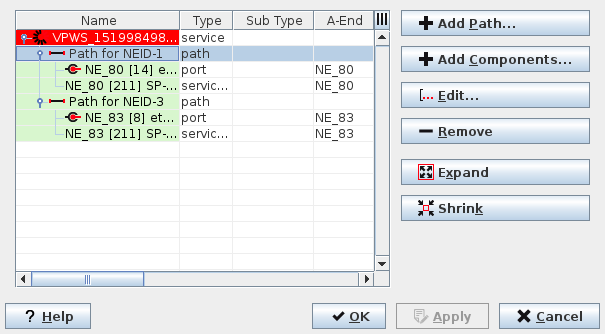
The Service Editor dialog is launched from the Service Supervision main dialog to create or edit services. It looks similar to the main dialog, with the following differences:
− Displays only the details of the current service being created or edited
− Does not show the status and alarms
− Allows deleting the current service
− Allows adding or removing Service Path(s), Service Component(s)
− Allows editing the existing Path and service attributes of the current service.
− When opened from the “Edit” menu or context menu entry “Show Details…” of a section in the section manager, only the specific section is shown with the respective service attributes. The view can be expanded or collapsed.
Dialog image
Service Editor
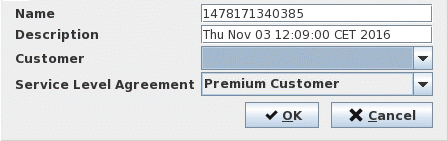
Service Info Attributes
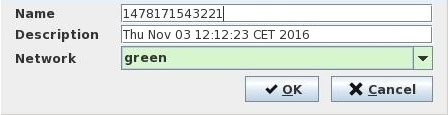
Path Info Attributes
Mandatory entries
A service should have at least one path and one component in order to be created.
Optional entries
The Service and Path Info attributes entries.
Informational content
Displays details of the current service being created or edited.
Controls (buttons, menu items, etc.)
Service Editor menu, Service/Path context menu
Add Path… |  | Add a path to the selected service. Calls the Path Info Attributes dialog. |
Add Components… | | Add a component to the selected item. Calls the Components Selector dialog. |
Edit |  | Edit the selected element. If the selected element is: - a service: Calls the Service Info Attributes dialog; - a path: Calls the Path Info Attributes dialog. |
Remove |  | Deletes the selected element and all its lower level members. |
Expand |  | Shows the members of the selected element. All lower levels of the selected item are expanded simultaneously. A collapsed element can also be expanded by double-clicking the entry in the list. |
Shrink |  | Hides the members of the selected element. All lower levels of the selected items are collapsed simultaneously. An expanded element can also be collapsed by double-clicking the entry in the list. |
? Help | Calls the help viewer and opens this page. | |
OK | Saves the changes and exits the dialog. | |
Apply | Saves the changes without exiting the dialog. | |
Cancel | Exits the dialog without saving the changes. |
Table Sorting and Filtering
Please refer to Table Sorter section for details.
Service Info Attributes
Name | Enter a name for the service. |
Description | Enter a description of the service. Default: The current date and time of service creation. |
Customer | (Optional) Select one of the existing customers from the drop-down menu. Note: To create new Customer, go to Customer Manager dialog |
Service Level Agreement | (Optional) Select one of the existing SLAs from the drop-down menu. Note: To create new SLA, go to SLA Manager dialog. |
OK | Creates the service. |
Cancel | Exits the dialog without creating the service. |
Path Info Attributes
Name | Enter name of the service path |
Description | Enter a description of the service path. |
Network | Selects the Network it is part of. - red - green - blue - yellow Note: The network is an attribute that allows coloring and filtering paths and components according to their physical implementation. |
OK | Creates the Path |
Cancel | Exits the dialog without creating the Path |
Related dialogs/windows
Service Supervision Service Supervision,