
Pseudo Wire
Purpose
Displays all existing Pseudo Wires in the ENP.
Allows you to show details of a selected Pseudo Wire.
Allows you to modify a selected Pseudo Wire, and to set its Admin State to “up” or “down”.
Entries in the Pseudo Wire table are filtered with the Class Type Filter on the left hand side (see ENP Main Window).
Dialog image
ENP – Pseudo Wire
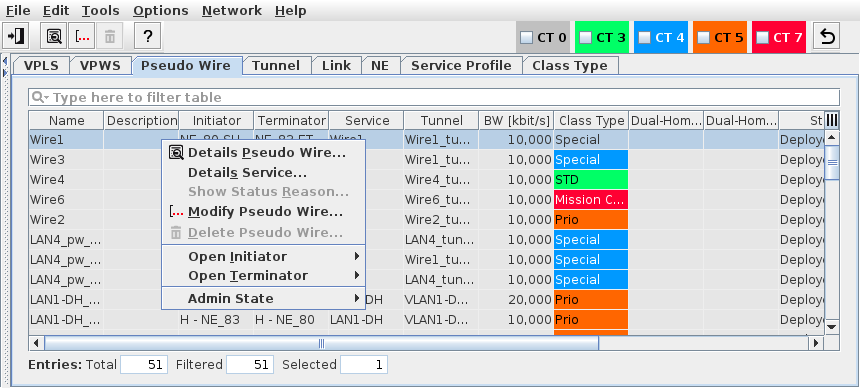
Mandatory entries
Not applicable.
Optional entries
Not applicable.
Informational content
Name | The specified Name of the Pseudo Wire. |
Description | The specified Description of the Pseudo Wire. |
Initiator | The ingress LER. |
Terminator | The egress LER. |
Service | Name of the VPLS or VPWS. |
Tunnel | Tunnel Name. |
BW [kbit/s] | Configured bandwidth. |
Class Type | Shows the configured Class Type as configured in the Class Type (HQoS Class Type Definition) dialog. |
Class Type Id | The ID of the Class Type assigned to the service. This parameter is hidden by default. It can be made visible via the table header context menu. |
Dual-Home Group | The Dual-Home group name. |
Dual-Home Role | The Dual-Home role. |
PW Control Word | Shows whether PW Control Word is enabled or disabled. |
LLF | The Link Loss Forwarding state (On, Off). |
Status | Indicates the Status of the Pseudo Wire: - Deploying: Indicates the progress of deploying the selected Pseudo Wire. - Removing: Indicates the progress of deleting the selected Pseudo Wire. - Deployed Valid: The path is complete. The Pseudo Wire and LSP(s) are saved in the FOXMAN‑UN database and are deployed to the nodes. - Deployed Invalid: The Pseudo Wire is incomplete, i.e. there is a hole in the path. It is saved in the FOXMAN‑UN database and is deployed to the nodes. - Saved OK: The path is complete. The Pseudo Wire and LSP(s) are saved in the FOXMAN‑UN database. - Saved Incomplete: The Pseudo Wire is incomplete, i.e. there is a hole in the path. It is saved in the FOXMAN‑UN database. |
Tunnel Status | Indicates the status of the related tunnel. |
Admin State | The administrative state of the Pseudo Wire. It can be set to “up” or “down” via ENP menu or context menu. |
Supervision | Service Supervision status, - Running: this Pseudo Wire is supervised. Supervision can be paused or disabled via the “Supervision ► Pause” or “Supervision ► Disable…” commands in the context menu or the “Edit” menu. - Paused: service supervision is paused on this Pseudo Wire. It can be resumed via the “Supervision ► Resume” command in the context menu or the “Edit” menu. - Disabled: service supervision is disabled on this Pseudo Wire. It can be enabled via the “Supervision ► Enable…” command in the context menu or the “Edit” menu. |
Superv. Oper State | Shows the operational state (up, down) of the service supervision on this Pseudo Wire. This field is empty when service supervision is disabled. |
Fault State | Shows the highest active fault state of the Pseudo Wire. |
Operation | The operation status during deployment or removal: - Deploy Pending, - Deploy Executing, - Remove Pending, - Remove Executing, - Success. |
Controls (buttons, menu items, etc.) / Context Menu
Edit
Details Pseudo Wire… |  | Opens the Pseudo Wire Details dialog window to view all details of the Pseudo Wire, the Attachment Circuits, and related QoS and rate limiting settings. See Pseudo Wire Details dialog. |
Details Service… | Opens the details view of the related service using the Pseudo Wire, preselects the Pseudo Wire, and shows the Pseudo Wire details in that dialog. | |
Show Status Reason… | Opens a window with additional information on the most probable reason for an unaligned or invalid status if applicable to the selected item. | |
Modify Pseudo Wire… |  | Opens the Pseudo Wire settings in Edit mode. In the Pseudo Wire dialog window you can select a different Tunnel for changing the allocation between Tunnel and Pseudo Wire and deploy the change. See Pseudo Wire Details dialog. |
Delete Pseudo Wire… |  | Deletes a Pseudo Wire provided it has an invalid state, and it is not used by any service. The “Delete Pseudo Wire” menu option is not available for regularly deployed Pseudo Wires. |
Open Initiator ► | ||
Open Terminator ► | ||
Admin State | - Up: Sets the admin state of the Pseudo Wire to “up”. - Down: Sets the admin state of the Pseudo Wire to “down”. | |
Supervision ► Enable… |  | Enable supervision for this Pseudo Wire. To do that, the service information attributes Customer, Service Level Agreement, and Network need to be selected. |
Supervision ► Disable… |  | Disable supervision for this Pseudo Wire. Must be confirmed by the user. If any service supervision cannot be disabled, an error message is shown with the respective reason(s). |
Supervision ► Resume |  | Resume service supervision that has been paused before. |
Supervision ► Pause |  | Pause service supervision. |
Supervision ► Reload Configuration | Reloads the configuration from the NEs to make sure it is up to date in case of recent changes to the Pseudo Wire. | |
Supervision ► Show Details… | Show service supervision details for this Pseudo Wire. Opens the service in a view-only window of the Service Editor. The windows also provides an alarm tab showing active alarms of the Pseudo Wire. | |
Supervision ► Show in Service Supervision… | Opens the service supervision dialog with a filtered view for the Pseudo Wire. |
Related dialogs / windows