
NE Maintenance Mode
Purpose
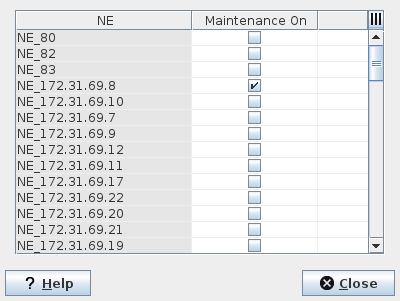
Allows you to put selected NEs to maintenance mode and prevent them from reporting service alarms while doing maintenance. Whenever at least one NE is in maintenance mode a notice “NE(s) are in Maintenance Mode” appears in the upper right area of the Service Supervision Service Supervision.
The NE Maintenance Mode is called from the Service Supervision Service Supervision via the “Edit – Manage NE Maintenance Mode…” menu entry.
To check which NEs are in maintenance mode, click on the “Maintenance On” column header to change the table sorting until the NEs with maintenance mode “On” are listed on top. Alternatively you can set a filter to show NEs with maintenance on only.
Dialog image
NE Maintenance Mode
Mandatory entries
Not applicable.
Optional entries
Select NE(s) for which the maintenance mode shall be activated.
Informational content
NE | Name of the NE. |
Controls (buttons, menu items, etc.)
Maintenance On | A mark in the checkbox sets the selected NE to maintenance mode. |
? Help | Calls the help viewer and opens this page. |
Close | Closes the dialog. |
Table Sorting and Filtering
Please refer to Table Sorter section for details.
Related dialogs/windows
Service Supervision Service Supervision,