
Customer Manager
Purpose
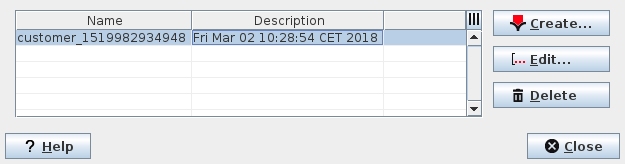
Displays the name and description of all the managed customers.
Allows adding new managed customers, deleting or editing the existing customer profiles.
Dialog image
Customer Manager
Customer Editor

Mandatory entries
Not applicable.
Optional entries
Customer Editor entries.
Informational content
List all the managed customers.
Controls (buttons, menu items, etc.)
Customer Manager
Create… |  | Calls the Customer Editor dialog to create a new customer. |
Edit… |  | Calls the Customer Editor to edit Name and/or Description of currently selected customer. |
Delete |  | Deletes the selected customer entry. |
? Help | Calls the help viewer and opens this page. | |
Close | Closes the dialog. |
Table Sorting and Filtering
Please refer to Table Sorter section for details.
Customer Editor
Name | Enter a name of the customer |
Description | Enter a description of the customer. Default: The current date and time of service creation. |
OK | Creates the new customer and exits the dialog. |
Cancel | Exits the dialog without creating the customer. |
Related dialogs/windows
Service Supervision Service Supervision,