
SLA Manager
Purpose
The Service Level Agreement (SLA) contains the service reliability/performance metrics that can be negotiated between the service provider and a customer to guarantee levels of quality for traffic transiting the network.
The current implementation monitors only the actual Service Availability and compares it against the Service Availability threshold set in the SLA. If this threshold is crossed, an SLA violation is reported in the Service Reporting dialog.
The future implementation will likewise monitor the other service performance metrics such as latency, BW, BER. Their observed values will be compared against the service level thresholds set in the SLA.
Dialog image
SLA Manager, SLA Editor
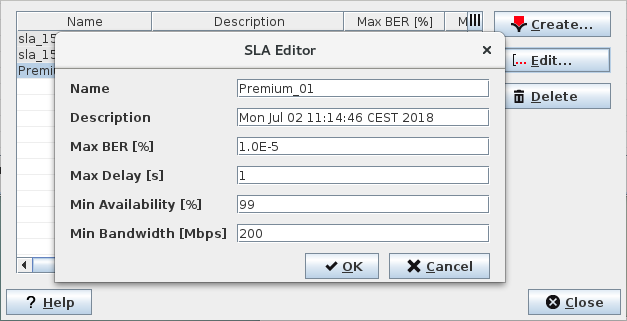
Mandatory entries
Valid values for the SLA metrics:
− max. BER
− max delay
− min availability
− min bandwidth

Please note:
Currently only the min. availability metric is evaluated by the system. You can retain the default values of the other SLA metrics.
Optional entries
Name, Description
Informational content
Displays the configured performance metrics for each SLA.
Controls (buttons, menu items, etc.)
SLA Manager
Create… |  | Calls the SLA Editor dialog to create new SLA. |
Edit… |  | Calls the SLA Editor dialog to edit values of the currently selected SLA. |
Delete |  | Deletes the selected SLA(s). |
? Help | Calls the help viewer and opens this page. | |
Close | Closes the dialog. |
Table Sorting and Filtering
Please refer to Table Sorter section for details.
SLA Editor
Name | Enter a name for the SLA. Maximum length is 100 characters. |
Description | Enter a description for the SLA. Maximum length is 1000 characters. |
Max BER [%] | Maximum allowed Bit Error Rate (BER) in percent, e.g. enter 10 for a Max. BER of 10%. |
Max Delay [s] | Maximum allowed service end-to-end transit delay or packet delivery delays in seconds. |
Min Availability [%] | Minimum allowed service availability in percent, e.g. enter 99 for 99% Availability. Note: Operational availability is defined as the percentage of time a service is available to end users. |
Min Bandwidth [Mbps] | Minimum allowed lowest transmission rate in Megabits/second for a service. This is the BW that is always guaranteed by the service provider. Any BW utilization that is below the set threshold is considered degraded service of the network. |
OK | Creates the SLA and exits the dialog. |
Cancel | Exits the dialog without creating the SLA. |
Related dialogs/windows
Service Supervision Service Supervision,