
Table Sorter
FOXMAN‑UN’s dialogs represent data and information in table form. FOXMAN‑UN allows you to sort, filter and re-organize the table’s rows and columns to help you manage the complex data effectively. This feature is characterized by:
• clickable, resizable and draggable columns
• Numeric/alphabetic sorting
• Multi-column sorting
• filtering/searching function
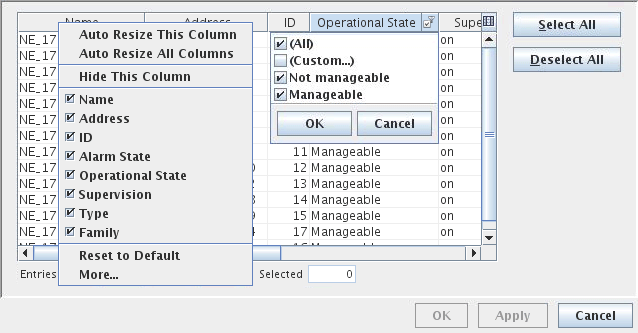
The other criteria are self explanatory and hence are not explained in this section.
Controls (buttons, menu items, etc.)
Context menu in each column
Auto Resize This Column |
Auto Resize All Columns |
Hide This Column |
Show Hidden Columns |
Reset to Default |
More… Allows the user to choose the column(s) to be displayed in the table. |
Alphabetic/Numeric Column Sorting
The list can be sorted alphabetically/numerically in ascending or descending order for each column by clicking on the column header. |
Multi-Column Sorting
It is possible to specify multiple-column sort criteria. For example, to sort the list first by “New Severity”, then by “Unit”: “Ctrl+click” the “New Severity” column header (1), then “Ctrl+click” the “Unit” column header (2). |
Filtering in each Column
The columns can be filtered individually. For example to filter for Operational State of the NE, follow these steps: Place your pointer on the “Operational State” column header. Click the filter symbol  as shown in the figure above. as shown in the figure above.Select your filter criteria. For example, “Operational State” column can be filtered as follows: All, Custom, Not Manageable, Manageable. |
The Custom criteria lets you define filter conditions.
Custom Filter for Alphabetic Column
The search criteria are case sensitive.
String (*,? supported) | This is supported at any position. * is the wildcard for zero to many characters. ? is the wildcard for exactly one character. |
is anything | To display all the elements. |
is | To select a specific element to be displayed. |
doesn’t equal | To select a specific element to be hidden. |
is in | To select all or specific element(s) to be displayed. |
isn’t in | To select all or specific element(s) to be hidden. |
is empty | To hide all the elements. |
is not empty | To display all the elements. |
begins with | To select a specific element beginning with a certain character. |
ends with | To select a specific element ending with a certain character. |
contains | To select a specific element including a certain character. |
doesn’t contain | To select a specific element not including a certain character. |
Custom Filter for Numeric Column
Number (<,>,=,- supported) | To select from the list specific numeric value(s) of the element to be displayed. To specify one or more elements, the following conditions can be applied: = to specify the specific numeric value (ID, Period) of the element to be displayed, e.g. Value(s) =58 or 58 displays the element with ID number 58. > to display all the elements with the numeric value greater than the specified value, e.g.Value(s) >58 displays all the elements with ID number greater than 58. < to display all the elements with numeric value less than the specified value. - to specify a range, e.g., 10-20 will show all values from 10 to 20 including the bounds. |
Export and Printing
Export… | Allows exporting/saving the table contents into a csv or xml file. |
Printing… | Allows printing the table contents. |
Counter: Entries
Total | Total number of table entries (unfiltered). |
Filtered | Number of table entries matching the filtered criteria. Green: no entries hidden by the filter. Orange: 1 or more entries hidden by the filter. Pink: all entries hidden by the filter. |
Selected | Number of highlighted table entries (Ctrl+click) to “Select” or “Deselect”. |
Hitachi Energy Ltd
Bruggerstrasse 72
5400 Baden - Switzerland