
Create Link
Purpose
Allows you to create a link, which may have MPLS-TP interfaces equivalent to a physical section as end points, or which may have MPLS-TP interfaces consisting of VLAN sub-interfaces as end points. VLAN sub-interfaces are logical VLAN interfaces as configured via the FOXCST GUI on a physical, MPLS-TP capable port of the core unit.
To create a VLAN sub-interface, open the respective NE in the FOXCST GUI,
• select a front port of the core unit;
• go to the “Main” dialog of the port;
• select the “Port Type” tab and set the port’s “Usage” to “VLAN Subinterfaces”;
• apply the setting, and you will have a “VLAN Subinterfaces” tab in the “Main” dialog of this port;
• click on the “Create a new VLAN subinterface” button;
• in the “Create Subinterface” dialog add the required VLAN ID and set the required “Assigned Bandwidth”;
• click OK to add the VLAN sub-interface;
• back in the “Main” dialog set the “Usage” of the added VLAN sub-interface to “MPLS-TP”.
Once you have added a VLAN sub-interface it will be available for selection A End TP or Z End TP of a link.
Dialog image
Create Link
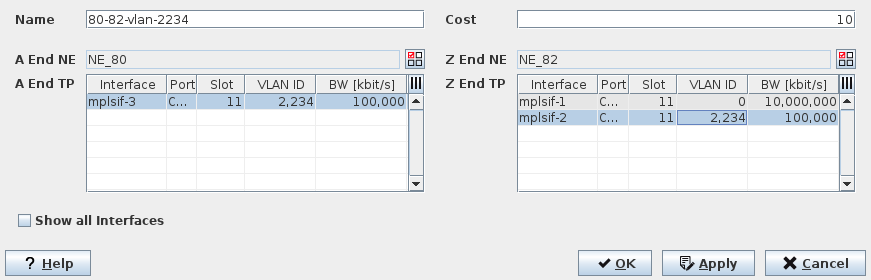
Mandatory entries
The following parameters can be modified:
− Name (there is only one name per link, independent of the Class Type),
− Cost; can be modified individually per CT link.
− A End NE; the name of the NE on the A end of the link,
− Z End NE; the name of the NE on the Z end of the link,
− Use for Routing; can be modified individually per CT link,
Optional entries
The following parameters can be modified:
− Name (there is only one name per link, independent of the Class Type),
− Total Bandwidth (BW) of the link (requires Traffic Engineering user privileges); can be modified individually per CT link,
− Use for Routing; can be modified individually per CT link,
− Cost; can be modified individually per CT link.
Controls (buttons, menu items, etc.)
Name | The name of the new link. | |
Cost | The cost of the new link. | |
A End NE Z End NE |  | Select the A End NE and Z End NE from the list of available NEs. NEs are available only if they have been added to the ENP domain. |
A End TP Z End TP | The A End Termination Point. The Z End Termination Point. In case of a physical interface the VLAN ID is 0. In case of a VLAN sub-interface, the VLAN ID is as configured for this VLAN sub-interface (other than 0). | |
Interface | MPLS-TP interface ID. The ID is “mplsif-n”, where “n” is a number starting from 1. As a default only interfaces suitable for link creation are shown. Also see “Show all interfaces”. | |
Port | Port ID, consisting of - unit name, - slot no., - port ID, - VLAN ID (in case of VLAN sub-interface). | |
Slot | Slot no. | |
VLAN ID | VLAN ID: “0” in case of a physical interface, “1” to “4089” in case of a VLAN sub-interface. | |
BW [kbit/s] | The link bandwidth in kbit/s. | |
Link | When “Show all interfaces” is enabled, this column shows the link name of interfaces used for existing links. | |
Show all interfaces | When enabled, all MPLS-TP interfaces of the NE are shown, including those being already used for an existing link. This is for information purposes only. When disabled, only unused interfaces are shown that are available for creation of a new link. |
? Help | Calls the help viewer and opens this page. |
OK | Applies the link creation and closes the dialog. |
Apply | Applies the link creation without closing the dialog. |
Cancel | Closes the dialog without applying the modifications. |
Related dialogs / windows
Link tab,