
Segments
Purpose
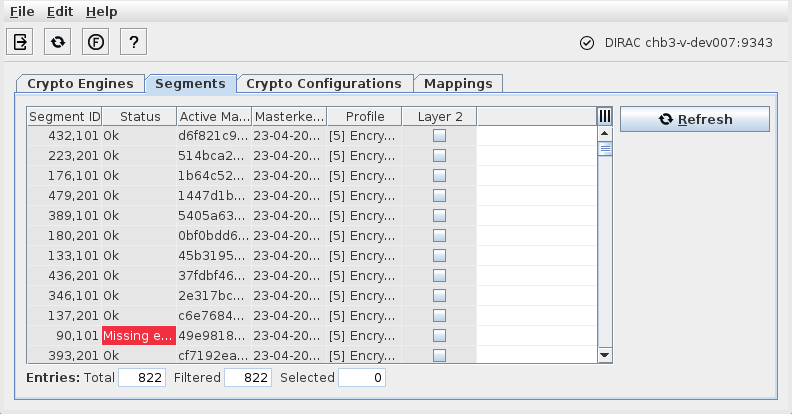
Lists the encryption segments and some related information managed by the DIRAC server.
Dialog Image
Informational content
Segment ID | The ID of the current segment. The ID is composed of a counter for the segments per NE and a number derived from the Crypto Engine. |
Status | The segment status. The status can be as follows: - OK; - Missing endpoint; → Needs configuration of a missing segment end point. - Too many endpoints; → Needs re-configuration of ambiguous segment end points. - Mismatching active master key; → Usually a master key refresh solves this. - Mismatching crypto profile; → Check configuration of the segment or tunnel. - Outdated master key; → Perform a master key refresh. - Unknown master key creation time; → Perform a master key refresh. - Wrong segment initialization; may happen after upgrade. → Perform a master key refresh. |
Active Masterkey | A hash of the currently active master key. |
Masterkey Activation Time | The activation time of the current master key for the segment. The default format is yyyy-MM-dd hh:mm:ss. |
Profile | The encryption Profile applied to the segment. |
Layer 2 | When marked, indicates that this is the segment that defines the SyncE and PTP L2 protocols encryption behavior. |
AEnd | Identifier for the A-End of the segment, composed of NE name, unit name and slot, port number. |
ZEnd | Identifier for the Z-End of the segment, composed of NE name, unit name and slot, port number. |
Controls (buttons, menu items, etc.)
Exit |  | Closes the Ethernet Security Manager dialog. |
Refresh |  | Refresh the contents of the window. |
Functional Unit View |  | Opens the Functional Unit View. |
? Help |  | Calls the help viewer and opens this page. |
Context Menu Options on selected segment(s): | ||
Refresh Masterkey | Refreshes the master key for the selected segment(s). | |
Show Crypto Configurations | Opens the Crypto Configurations tab. | |
Related dialogs/windows