
Functional Unit View
Purpose
Displays details of port components of the crypto configuration on the current NE. The required port item can be selected from a tree structure in the left hand side of the dialog window. The tree includes the NE, its core units and encryption units, and the ports that are part of or eligible for the crypto configuration.
A Functional Unit provides a total of four (eight) Encryption Unit front ports, two (four) towards the core unit (unencrypted), and two (four) towards the network (encrypted, marked with locked padlock symbol on the unit front).
Dialog Image
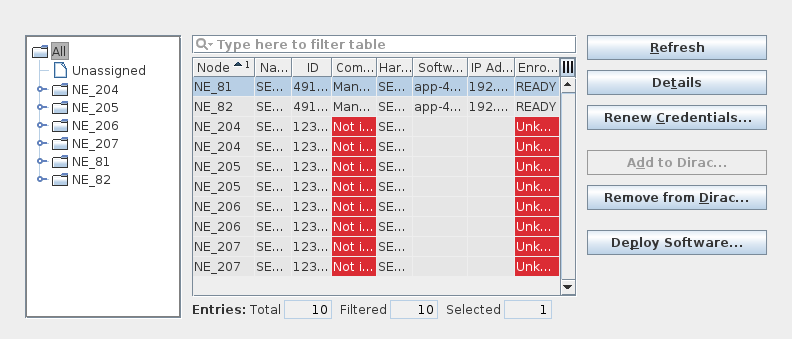
Functional Unit View (Overview - All)
Informational content
The information displayed on the right hand side depends on the object selected in the tree:
• When “All” is selected, all detected FUs (encryption units) are listed; when a node is selected, the FUs (encryption units) installed in the respective node are listed. In both cases the following Functional Unit (FU) information is listed on the right hand side:
− Node:
Name of the node;
− Name:
Identification of the FU via unit name and slot, and FU index;
− ID:
FU ID, composed of HW serial number and FU index;
− Communication Status:
“Manageable” or “Not in Dirac”;
− Hardware:
HW name;
− Software:
Installed software name_version;
− IP Address:
IP address of the FU registered in DIRAC;
− Enrollment Status.
Commands
The following command buttons are available when at least one node in the table is selected:
− Refresh:
Refreshes the table contents.
− Details:
Open the details view for a selected table entry.
− Renew Credentials…:
Opens a dialog to authorize DIRAC public keys for the selected Functional Unit(s) authentication. This will require to enter the Maintainer and Administrator passwords.
This can be used after a software upgrade on the FU from pre-r17a SW versions instead of removing the FU from DIRAC and re-adding it to DIRAC. It can also be used in case of a unit reset and/or loss of connectivity.
After entering the correct Maintainer and Administrator passwords, processing of credentials renewal is started. This may take some time until completion. When completed successfully, a confirmation “Credentials set correctly” is issued. This must be acknowledged by clicking the “OK” button.
− Add to Dirac…:
Opens a dialog to add a FU to DIRAC.
− Remove from Dirac…:
Opens a confirmation dialog to remove the selected FU entry from DIRAC.
− Deploy Software…:
Opens a dialog to deploy a FU software to selected FUs if software is available in the respective software installation folder (/opt/dirac/addon/ESW).
If the FU has not yet been added to DIRAC or its communication status is “Not in Dirac”, the Maintainer password is required to install FU software via the command “Deploy Software”.
If the FU communication status is “Manageable”, the Maintainer password is not required.
If no software is available, an error messages pops up that needs to be acknowledged.
For the FU detail view, i.e. with an FU selected in the tree, refer to the next dialog image.
Dialog Image
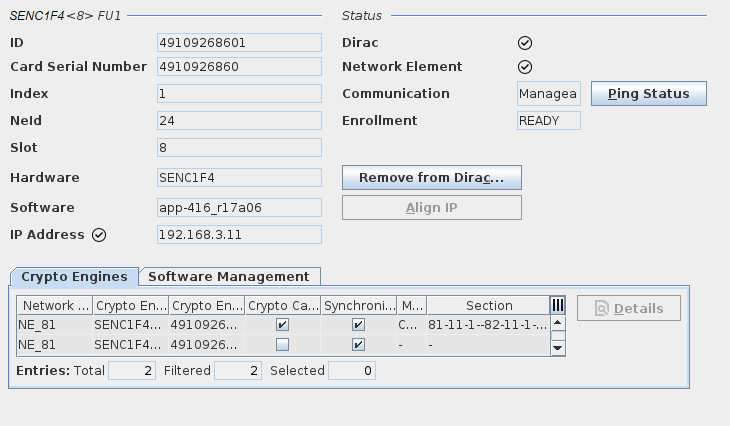
Functional Unit View (FU details) and “Crypto Engines” tab
Software Management (FU details), “Software Management” tab
Informational content
When a specific encryption FU of a node is selected, the FU’s details are listed on the right hand side of the Functional Unit View as follows.
• FU Properties:
− ID: the ID of the FU composed of the card serial number and the Crypto Engine index;
− Card Serial Number: the serial number of the card HW;
− Index: the FU index on the card HW;
− NEId: the ID of the NE in the NEM Configurator;
− Slot: the slot of the card within the NE subrack;
− Hardware: the name of the card HW;
− Software: the name of the installed SW, including a version identifier;
− IP Address: the IP address of the FU. To configure the IP address of the FU open the configuration of the unit in the FOXCST.
• Status:
− Dirac Status;
− Network Element Status;
− Communication (Manageable or Not Manageable);
− Enrollment Status (Unknown, READY, NOT READY).
• Crypto Engines tab: table listing the Crypto Engines available on the same card HW for a selected FU:
− Network Element name;
− Crypto Engine Unit: Encryption unit name and slot;
− Crypto Engine ID: composed of the card serial number and the Crypto Engine index;
− Crypto Capable: True, False;
− Communication: Manageable or Not Manageable;
− Synchronized: True, False;
− Mapped To: core unit name and slot;
− Section: Name of the “core unit to FU” section in the section manager.
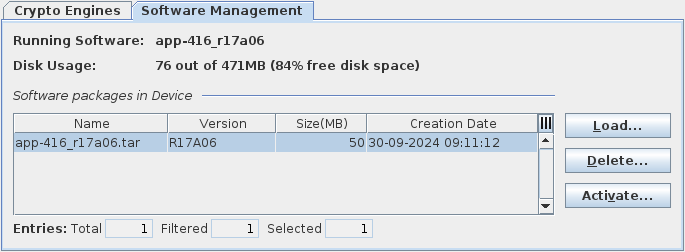
• Software Management tab: To allow software management by DIRAC for FU software of release R16B or later, you need to enter the maintainer and administrator passwords for the SENC1 series FUs.
Once the correct passwords are entered, the “Software Management” tab provides information on the FU selected in the FU tree on the left-hand side of the dialog window:
− Running Software: shows the name and version of the running SW;
− Disk Usage: shows the used and total disk space, and the percentage of free disk space;
− Table with software packages information, such as name, version, size (MB), and creation date of the software on the FU;
− Command buttons to load, delete, and activate software on the FU.
In addition to the informational content, the following controls are available; some of the commands are dependent on the current Enrollment status:
Controls (buttons, menu items, etc.)
Ping Status | Send a ping request to the FU to update the communication status. |
Install Software | Install software on the FU. |
Enroll and Add to Dirac | Enroll the FU and add it to the DIRAC database. |
Add to Dirac | Add an enrolled FU to the DIRAC database. |
Remove from Dirac… | Remove the FU from the DIRAC database. |
Align IP | Align the IP address of the FU. Not available if the FU enrollment status is unknown or if its is IP address is already aligned. |