
Create Mapping
Purpose
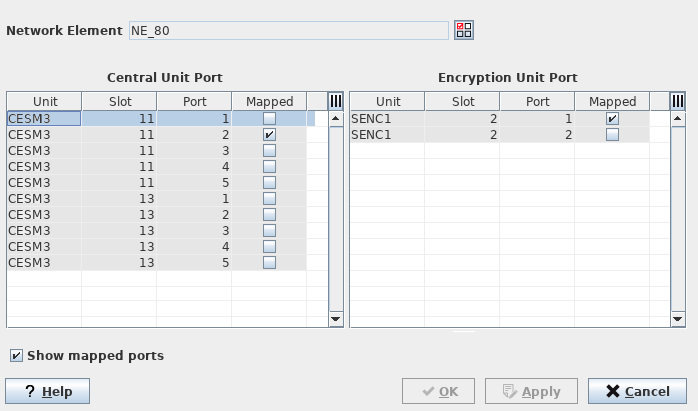
Supports you in defining mappings between ports of the core unit (“Central Unit”) and ports of the encryption unit for a specific Network Element. The dialog is called from the Ethernet Security Manager - Mappings tab via the “Create” button.
A mapping defines the local physical connection of a link between the front port on the core unit and the front port on the encryption unit for links that shall transport encrypted tunnels.
The link segment (mapping) between a front port of a core unit and a front port on the encryption unit should always be a local physical connection of the same Network Element. The link segment between the encrypted front port of the local encryption unit and the encrypted front port of the remote encryption unit usually bridges the distance between two nodes with encrypted MPLS-TP tunnels.
Dialog Image
Informational content
Network Element | The selected Network Element Name. |
Unit | The unit name. |
Slot | The slot where a core unit (Central Unit) or an Encryption Unit is installed. |
Port | The port used for the mapping between Encryption Unit and core unit (Central Unit). |
Mapped | A marked box indicates that the item is already mapped and cannot be re-used. This box is read-only. |
Controls (buttons, menu items, etc.)
Network Element |  | Select Network Element on which the mapping shall be created. This button calls the “Select NE” dialog to select one NE at a time. |
Show mapped ports |   | An empty box prevents the mapped ports from being displayed. A marked box includes the ports that are already mapped and enables the “Mapped” column. |
? Help | Calls the help viewer and opens this page. | |
OK | Creates the Mapping and exits the dialog. | |
Apply | Applies the Mapping without exiting the dialog. | |
Cancel | Closes the dialog without creating the Service. |
Related dialogs/windows