
Encryption
Purpose
Set the parameters for tunnel encryption (applicable only for encrypted tunnels):
− Select the Working Encryption Profile,
− Select the Protection Encryption Profile,
− Create Encryption or Delete Encryption.

Please note:
As a prerequisite to configuring and operating tunnel encryption you need to install and set up:
• at least one encryption unit (SENC1 series) per node,
• a centralized key management system (DIRAC),
• a physical connection between core unit front port and encryption unit front port for each link (physical link or VLAN subinterface) that shall carry encrypted tunnels.
Please note:
For an encrypted tunnel, single segments may be unencrypted, either because there is no encryption unit available in the nodes for a specific segment, or because the operator has chosen not to enable encryption on that segment.
→ In such a case, no warning or alarm is issued, and the operator must make sure all segments are configured as per the operator’s requirements.
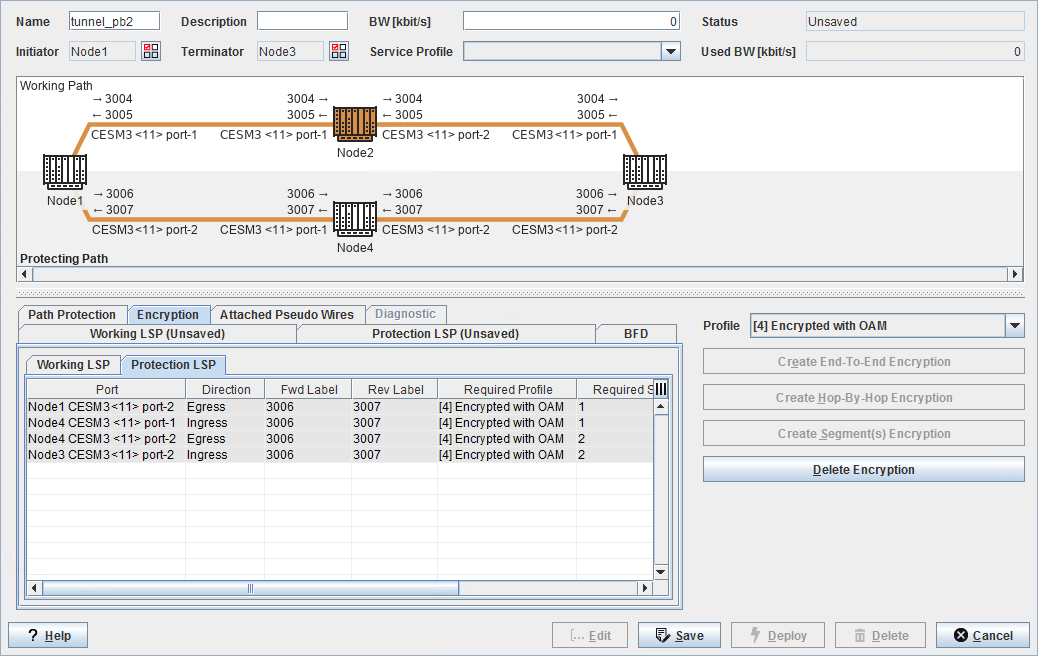
Dialog image
Tunnel – Encryption
Mandatory entries
Not applicable.
Optional entries
Encryption Profile
Informational content
LSP Graphical View | The LSP graph shows nodes and LSPs with encryption related information such as labels (Label In, Label Out). Encrypted LSPs are colored in gold: - Nodes with end-to-end encrypted LSPs are also colored in gold. - When hop-by-hop encryption is applied, only the segments are colored, but not the nodes. | |
 | For deployed tunnels with encryption, lock symbols are shown on each port of encrypted LSPs. In encryption (transmit) direction a closed padlock symbol is shown to indicate the encryption process at this port. | |
 | In receive direction an open padlock symbol is shown to indicate the decryption process at this port. | |
 | If for any reason a Crypto Engine (CE) or Crypto Configuration (CC) is missing the respective entries are colored red, and the label in the LSP graph is marked with a warning symbol. | |
Port | Shows the NE name, unit name, slot, and port ID of the tunnel end point port. |
Encryptable | Shows whether the LSP can be encrypted or not, depending on the provided infrastructure. If no encryption unit is available the checkbox will be empty; if an encryption unit is available the checkbox will be marked. |
Direction | Egress: this is the egress port as per the tunnel configuration. Ingress: this is the ingress port as per the tunnel configuration. |
Fwd Label | Shows the forward label. |
Rev Label | Shows the reverse label. |
Required Profile | Shows the required profile for tunnel encryption. This is as selected in Profile. |
Required Segment Id | While creating the tunnel, this shows the ID of the segment to which the encryption is to be applied. When displaying the tunnel details of an existing tunnel, this shows the segment ID for each of the segments. |
CE Profile | While creating the tunnel, this field is empty. When displaying the tunnel details of an existing tunnel, this shows the Crypto Engine (CE) profile applied to the tunnel. If a CE Profile had been configured and deployed but is missing, e.g. because it has been deleted manually, the status “Missing” is shown. |
CE Segment Id | While creating the tunnel, this field is empty. When displaying the tunnel details of an existing tunnel, this shows the Crypto Engine (CE) Segment ID for each of the segments. If a CE Profile had been configured and deployed but the CE Segment ID is missing, e.g. because the CE Profile has been deleted manually, the status “Missing” is shown. |
Controls (buttons, menu items, etc.)
Profile | Select the tunnel encryption profile (applicable to working and protection LSP in case of Protection): - None: No profile applied; this is the default, - [1] Discard: Discard all traffic, - [3] Encrypted & Authenticated without OAM: Encrypt and authenticate all traffic; do not use OAM, - [5] Encrypted & Authenticated with OAM: Encrypt and authenticate all traffic; use OAM. |
Applicable to Working LSP and Protection LSP separately: | |
Create End-To-End Encryption | Create end-to-end encryption for the current tunnel. For tunnels over one physical link this is identical to creating hop-by-hop encryption. |
Create Hop-By-Hop Encryption | Create hop-by-hop encryption for the current tunnel. In general, this creates separate encryption segments for each hop (link). For tunnels over one physical link this is identical to creating end-to-end encryption. |
Create Segment(s) Encryption | Create encryption on a segment basis, i.e. each segment is encrypted separately. |
Delete Encryption | Delete the encryption configuration from the current tunnel. |
Related dialogs / windows
Service Profile (depends on license option),