
Crypto Configurations
Purpose
Lists managed Crypto Configurations (encryption configurations). Allows you to create new Crypto Configurations, and to delete a selected Crypto Configuration. Provides details of a selected Crypto Configuration.
Dialog Image
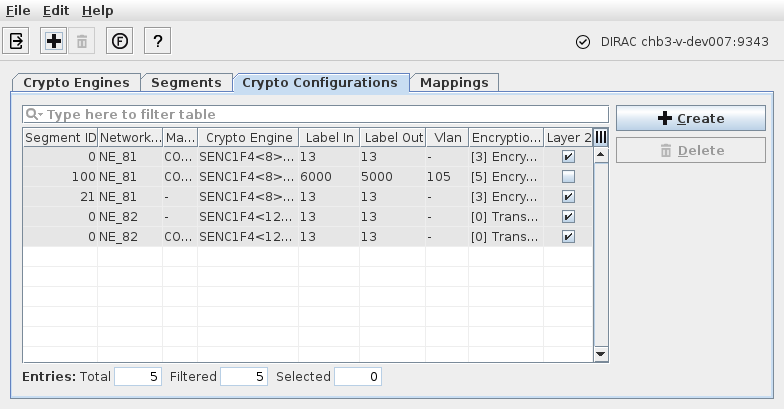
Informational content
Segment ID | The ID of the encrypted segment in the network. |
Network Element | The Network Element Name where the Encryption Unit and the Crypto Engine are located. |
Mapped To | The unit and physical port to which the Crypto Engine is mapped. |
Crypto Engine | The unique identifier (unit, slot, port) of the Crypto Engine. |
Label In | The In Label of the segment. |
Label Out | The Out label of the segment. |
VLAN | The VLAN ID. Applicable only if a VLAN is defined. |
Encryption Profile | The configured Encryption Profile. |
Layer 2 | When marked, indicates that this is the crypto configuration that defines the SyncE and PTP L2 protocols encryption behavior. |
Controls (buttons, menu items, etc.)
Exit |  | Closes the Ethernet Security Manager dialog. |
Create… |  | Creates a new Crypto Configuration. For this purpose you need to: - select an existing Crypto Engine, - enter a Segment ID, - enter a Label In, - enter a Label Out, - enter a VLAN ID (if applicable), and - select an Encryption Profile. The following Encryption Profiles are available: - [1] Discard: Discard all traffic, - [3] Encrypted & Authenticated without OAM: Encrypt and authenticate all traffic; do not use OAM, - [5] Encrypted & Authenticated with OAM: Encrypt and authenticate all traffic; use OAM. |
Delete |  | Delete a selected Crypto Configuration. |
Details… |  | Calls the Details window to show details of a selected Crypto Configuration. |
Functional Unit View |  | Opens the Functional Unit View. |
? Help |  | Calls the help viewer and opens this page. |
Related dialogs/windows