
Crypto Engines
Purpose
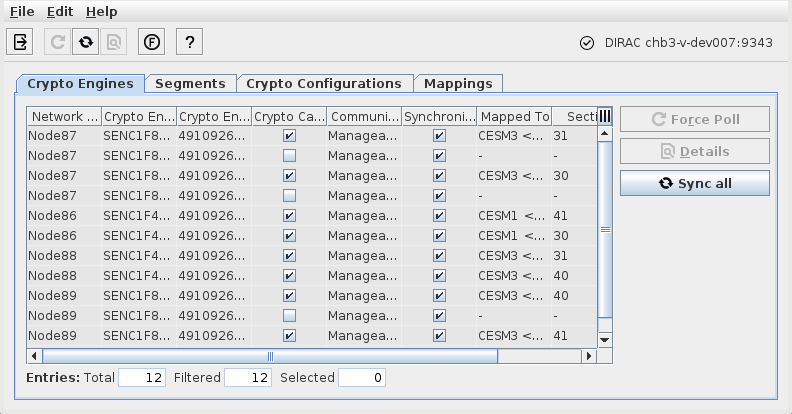
Lists the crypto engines with related information managed by the DIRAC server. For a specific crypto engine, provides detailed information via the “Details” dialog on a selected crypto engine.
Dialog Image
Informational content
DIRAC status | The DIRAC communication status is shown in the upper right corner of the dialog window. When a DIRAC server is installed on the same machine as FOXMAN‑UN, and if it is up and running, and communication is up with valid certificates, the status is indicated with - “DIRAC localhost:9343” or - “DIRAC <server_name>:9343” and an OK symbol. If the connection to the DIRAC server has failed the status is indicated with “No connection DIRAC <server_name>:9343” and a red exclamation mark symbol. In this case the server administrator needs to make sure the DIRAC server is up and running, and the certificates for secure communication are exchanged and valid between the FOXMAN‑UN and the DIRAC server. |
Contents of the “Crypto Engines” tab: | |
Network Element | The Network Element Name where the Encryption Unit and the Crypto Engine are located. |
Crypto Engine Unit | Encryption Unit HW type, <slot within the subrack>, and port. |
Crypto Engine ID | The unique identifier of the Crypto Engine, composed of the card serial number and the identifier of the Crypto Engine on the Encryption Unit (1 for Crypto Engine A; 2 for Crypto Engine B). |
Crypto Capable | If the checkbox is marked the Crypto Engine is capable of providing encryption. An unmarked checkbox indicates that the physical and/or logical setup is not suitable for providing encryption. |
Communication Status | The communication status of the Crypto Engine with the DIRAC. - Manageable: Communication between DIRAC and SENC1 series encryption unit is established. - READY Port ready for enrollment. - Not in Dirac: Port currently not configured in DIRAC. - Not Manageable: Communication between DIRAC and SENC1 series encryption unit is not established. |
Synchronized | If the checkbox is marked the Crypto Engine is synchronized. |
Mapped To | The core unit name, subrack slot and physical port to which the Crypto Engine is mapped. |
Section | The ID of the section |
Layer 2 | When marked, indicates that encryption for the SyncE and PTP L2 protocols is configured for that Crypto Engine. |
Controls (buttons, menu items, etc.)
Exit |  | Closes the Ethernet Security Manager dialog. |
Force Poll |  | Force a polling of the crypto configuration data for the selected Crypto Engine(s). |
Sync All |  | Reload the basic Crypto Engines information from DIRAC and update the list. |
Details… |  | Calls the Details window to display Crypto Engine details. |
Configuration (<user class>) | When selected from the context menu of an NE, opens the NE configuration in the FOXCST GUI with the chosen user class. | |
Functional Unit View |  | Opens the Functional Unit View. |
Show Mapping | When selected from the context menu of an NE, opens the Mappings tab. | |
Show Layer 2 | Shows L2 protocols encryption status. | |
Enable Layer 2 | Enable encryption of the SyncE and PTP L2 protocols for that Crypto Engine. | |
Disable Layer 2 | Disable encryption of the SyncE and PTP L2 protocols for that Crypto Engine. | |
? Help |  | Calls the help viewer and opens this page. |
Dialog Image (Crypto Engine Details)
Informational content
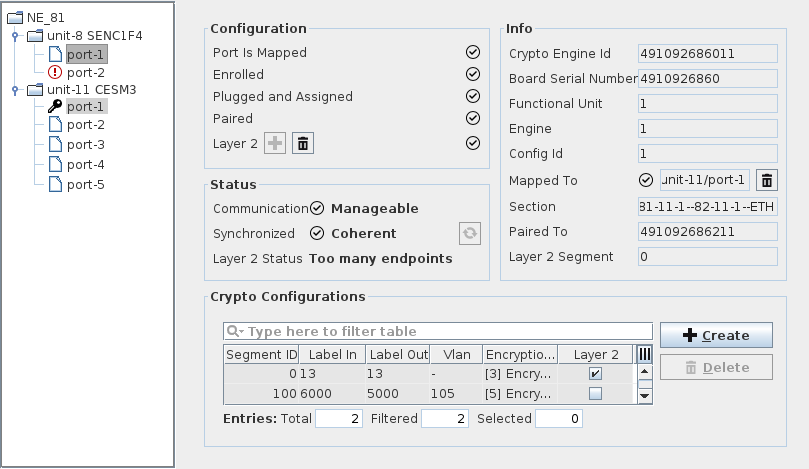
Configuration | Provides configuration details, such as: - Port mapping (Port is Mapped), - Enrollment status (Enrolled), - Assignment status (Plugged and Assigned), - Pairing Status (Paired), - Layer 2 setting active (Layer 2), with the option to add Layer 2 encryption for the SyncE and PTP protocols, or to delete Layer 2 encryption. |
Status | Provides status information, such as: - Communication status (Communication), - Synchronization status (Synchronized); can be updated by clicking the sync button, - Layer 2 Status (OK if layer 2 SyncE and PTP encryption is active). |
Info | Provides more information on the crypto engine, such as: - Crypto Engine Id: the ID of the Crypto Engine composed of the board serial number and the Crypto Engine index; - Board Serial Number: the serial number of the HW; - Functional Unit: the ID of the FU on the board; - Engine: the ID of the Crypto Engine on the FU; - Config Id; - Mapped To: the status and address of the mapped core unit port, with the option to delete the mapping; - Section: name of the section configured on the encryption port of the Crypto Engine; - Paired To: Crypto Engine Id of the Crypto Engine on the remote end; - Layer 2 Segment: ID of the layer 2 segment. |
Crypto Configurations | List of existing Crypto Configurations, with the option to create or delete a Crypto Configuration. Provides the following information (in columns): - Segment ID, - Label In, - Label Out, - VLAN, - Encryption Profile, - Layer 2. |
Related dialogs/windows