
Service Reporting
Purpose
The Service Reporting dialog is called from the Service Supervision Service Supervision via the menu selection “Tools – Generate Report…”.
Service Reporting displays the service end-to-end performance monitoring information as listed below:
− Service outage events
Displays the service outage or unavailability events and their durations.
− Service outage daily statistics
Displays the service unavailability instances count and time intervals for the 24h period.
− Service monthly availability
Displays the calculated service end-to-end Availability per month.It likewise detects threshold violations against the Availability QoS metric set in the SLA.
Service Availability percentage and Service Outage
The service availability required for reports are based on service outage events and their durations.
As per ITU-T G.826, the availability is calculated as follows:
Availability = ((Measured Time - UAS)/Measured Time)*100
where:
− Measured Time = Reporting time span in seconds, (note: 24 hr = 86,400 s)
− UAS (Unavailable Seconds) = outage or service unavailability in seconds
The table below provides an overview of the correlation of the Availability percentage and outage durations.
Availability | Downtime (Outage) per year | Downtime (Outage) per month |
|---|---|---|
99.9999% | 32s | 2.67s |
99.999% | 5min 15s | 26.25s |
99.99% | 52min 36s | 4min 23s |
99.9% | 8h 46min | 43min 50s |
99% | 3days 15h 40min | 7h 18 min |
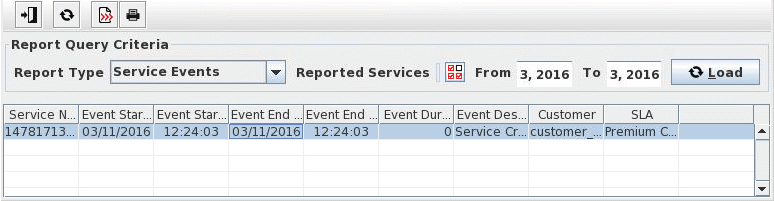
Dialog image
Report Viewer
Select Services
Mandatory entries
Select the Report Type and Time interval from the Report Query Criteria.
Optional entries
Not applicable.
Informational content
Displays detailed information for the service outages instances and durations as well as monthly availability.
Controls (buttons, menu items, etc.)
Exit |  | Closes the current dialog window. |
Load |  | Load Report according to criteria. |
Export |  | Export content of this table. Reports can be saved in the server directory as csv or.xml file. |
Print |  | Print content of this table |
Report Query Criteria
Report Type | ||
Service Events | Lists the Service Events within the specified reporting period. - Service Name - Event Start/End Date - Event Start/End Time - Event Duration - Event Description | |
Daily Failure Count 1 | List the Service Outage daily statistics within the specified reporting day. - Circuit Name (Service Name) - Report Day - Outage count - Shortage Outage - Longest Outage - Total Outage - Average Outage - Total Online Time Note: Outage measurements in seconds | |
Daily Failure Count 2 | List the Service Outage daily statistics within the specified reporting day. - Link Name (Service Name) - Report Day - Outage Start/End Time - Outage counts for the following outage durations:<10s ¦10s to 60s ¦1min to 10 min ¦ >10min - Number of Failure - Outage Time | |
Monthly Availability | List the service monthly availability within the specified reporting period. - % available for each month - YTD (Year-to-Date) % available. Average availability from the beginning of the year through current reporting period. - SLA applied - SLA Violations | |
Reported Services | ||
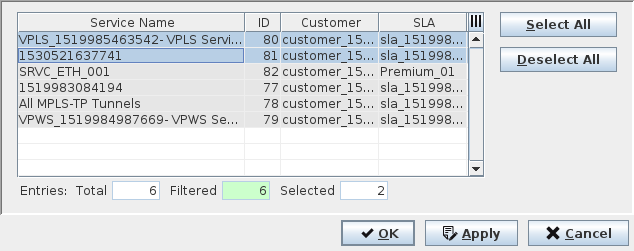
Select Services |  | Calls the Select Services dialog, which list all the available services. A specific service or services can be selected to be included in the Report. |
Date Range | ||
From/To | Defines the time interval or reporting period. | |
Select Services
Service Name | The name of the service specified in the Service Editor. | |
ID | The service ID. | |
Customer | The customer name specified in the Customer Manager. | |
SLA | The SLA name specified in the SLA Manager. | |
Select All | Selects all listed services for the report. | |
Deselect All | Deselects all listed services for the report. | |
OK | Applies the selected services and closes the dialog. | |
Apply | Applies the selected services without closing the dialog. | |
Cancel | Cancels the service selection and closes the dialog. |
Related dialogs/windows
Service Supervision Service Supervision,