
Profiles & CPS Tasks (legacy dialog)

Please note:
This dialog is only available by default if the FOXMAN‑UN client is running on the FOXMAN‑UN server machine. In all other cases the dialog is not available. It can be enabled by setting the parameter
blm.legacy = true
in the NMS.properties files on both server (in /opt/nem/etc) and client (in /opt/nem/client/etc). However, the use of this feature in a setup where FOXMAN‑UN server and client are running on different machines is insecure as it is based on TCP connections and required opening certain ports on the firewall for insecure communication.
Purpose
Please note:
Profiles and CPS tasks are only applicable to FOX61x NEs.
This dialog shows a list of all created Profiles and CPS tasks regardless of their status. Tasks can be monitored and their existing schedule reconfigured. Completed or aborted tasks can be removed, provided the FOXMAN‑UN user has the required access rights.
New tasks can be created via the dialog Profiles & CPS – Create Task (legacy dialog).
Profiles and CPS can be imported into or deleted from the FOXMAN‑UN database via the dialog Profiles & CPS – Administration (legacy dialog).
Dialog image
Profile & CPS: Tasks
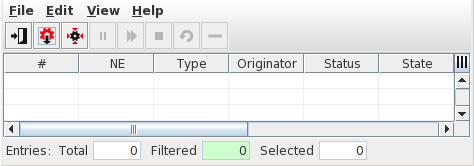
Mandatory entries
Not applicable.
Optional entries
Not applicable.
Informational content
List of all presently active tasks, whether completed or still pending.
A task consists of one or several sub-tasks, each dealing with a single NE. While a task is still pending, no sub-tasks are shown. After execution, the sub-tasks also appear in the list.
Controls (buttons, menu items, etc.)
Menu “File”
Create Tasks |  | Opens the dialog Profiles & CPS – Create Task (legacy dialog) where a new profile or CPS task can be configured. |
Administration |  | Opens the dialog Profiles & CPS – Administration (legacy dialog) where profiles and CPS can be imported or profiles can be created. |
Exit |  | Closes the current dialog window. |
Menu “Edit”
Depending on the status, the following functions may be available for the selected group task:
Hold Task |  | Prevents a scheduled task from being executed (status “Held”). |
Resume Task |  | Returns a task with status “Held” to status “Scheduled”. |
Abort Task |  | Aborts the existing schedule of a task. The task is kept in the list of current tasks. |
Retry Task |  | Opens the Schedule Task (legacy dialog) dialog where the existing schedule of a completed, scheduled or aborted task can be modified. |
Delete Task |  | Removes the task from the list. Only completed tasks (failed or successful) can be deleted. Scheduled tasks must be aborted first. Single sub-tasks cannot be deleted. |
Task Properties | Opens the dialog Task Properties which provides detail information of the task. Applicable to both tasks and sub-tasks. |
Please note:
To call the above functions it is also possible to use the context menu
instead of selecting a task and using the main menu.
instead of selecting a task and using the main menu.
Help – ? Help | Starts the FOXMAN‑UN help viewer and opens this page. |
Table Sorting and Filtering/Export and Printing
Please refer to Table Sorter section for details.
Related dialogs / windows