
Profiles & CPS – Administration (legacy dialog)
Purpose
The “Profile & CPS – Administration” dialog is used for importing/exporting profiles and CPS from and to the file system to and from the FOXMAN‑UN database. In addition profiles and CPS resident in NEs can be uploaded into the database.
New profiles can be created from either a template or by modifying an existing profile.
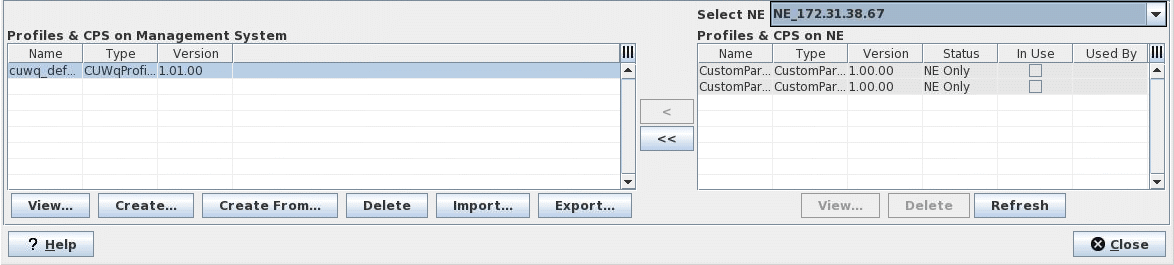
Dialog image
Profile & CPS
Mandatory entries
Not applicable.
Optional entries
Not applicable.
Informational content
List of all profiles and CPS stored in the FOXMAN‑UN database.
List of all profiles and CPS stored in the local database of the selected FOX61x NE.
Controls (buttons, menu items, etc.)
In “Profiles & CPS on Management System”
View… | Shows the details of the selected profile or CPS in the list “Profiles & CPS on Management System”. |
Create… | Calls the Profiles & CPS – Create Profile (legacy dialog) dialog where a new profile based on any of the available templates can be generated. |
Create From… | Calls a Create dialog based on the profile selected in the list “Profiles on Management System”. The template used cannot be modified. The name must be modified. All parameter values can be modified as required. |
Delete | Removes the selected profiles in the list “Profiles on Management System” from the FOXMAN‑UN database. |
Import… | Copies a profile from the file system and saves it in the database. |
Export… | Copies a profile from the database and saves in the file system. |
In “Profiles & CPS on NE”
Select NE | Select the NE from where profiles and/or CPS are to be uploaded and saved in the management system (FOXMAN‑UN database). |
View… | Shows the “View Profile” dialog of the selected profile in the list “Profiles on NE” with template used, name, description, and data. |
Delete | Removes the selected profile(s) in the list “Profiles on NE” from the local database of the selected NE. |
Refresh | Updates the list of all resident profiles and CPS of the selected NE. |
On the bottom of the dialog:
? Help | Starts the FOXMAN‑UN help viewer and opens this page. |
Close | Closes the dialog. |
Table Sorting and Filtering/Export and Printing
Please refer to Table Sorter section for details.
Related dialogs / windows
Not applicable.