
Schedule Task (legacy dialog)
Purpose
This dialog is opened from the “Task View (legacy dialog)” dialog via the menu selection “Edit – Retry Task”, or from the “Retry” icon. It allows re-scheduling an existing task, provided it is either completed (failed or successful) or aborted, or pending (scheduled).
Dialog image
Schedule Task
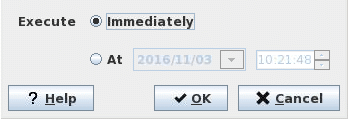
Mandatory entries
Immediately | Tick this box if the task is to be executed immediately after closing the dialog using “OK”. |
At (date and time) | On opening the dialog, date and time is preset to current date and time. - Clicking in the date field opens the calendar where a new date can be selected. - Clicking in the two digits of hours, minutes, or seconds allows you to change the hh, mm or ss with the up or down arrow keys. - Double clicking in the two digits of hours, minutes, or seconds allows you to enter a new value for hh, mm or ss. - Triple click in the time field selects the complete field. Enter the new time using 6 digits with colon separators in the form HH:mm:ss. |
Optional entries
Not applicable.
Informational content
Not applicable.
Controls (buttons, menu items, etc.)
? Help | Starts the FOXMAN‑UN help viewer and opens this page. |
OK | Applies the modifications and closes the dialog. |
Cancel | Closes the dialog without applying the modifications. |
Related dialogs / windows