
Profiles & CPS – Create Profile (legacy dialog)
Purpose
The “Create Profile” dialog allows adding a new profile based on one of the available templates to the FOXMAN‑UN database. From there it can be downloaded to any FOX61x NE in the managed network via Profiles & CPS Tasks (legacy dialog).
Dialog image
Profile & CPS: Create Task
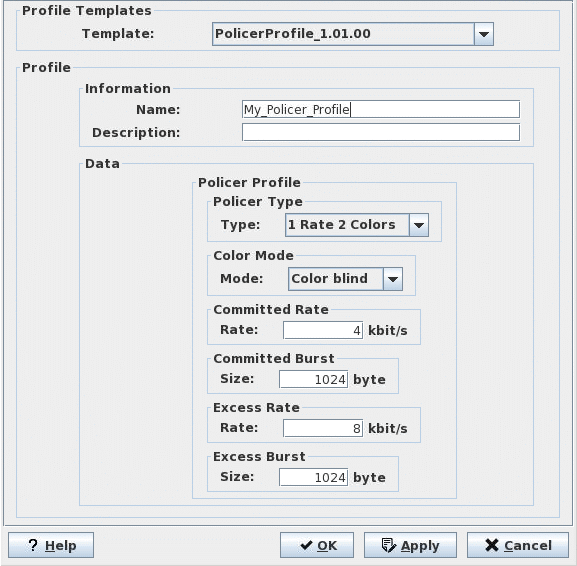

Please note:
The above is an example dialog. Depending on the selected template, the dialog will have different contents.
Mandatory entries
Template | The required template must be selected. |
Name | An adequate name must be specified. |
Data | Modify the relevant parameter values in the “Data” frame. |
Optional entries
Description | A short description stating purpose and/or content may be added. Maximum length of string 63 char, character set A-Z, a-z, 0-9, _ |
Informational content
List of all parameters contained in the profile and their values. The parameters and values are dependent on the profile template selected.
Controls (buttons, menu items, etc.)
? Help | Starts the FOXMAN‑UN help viewer and opens this page. |
OK | Creates the profile using the data entered, saves it in the FOXMAN‑UN database and closes the dialog. |
Apply | Creates the profile using the data entered and saves it in the FOXMAN‑UN database without closing the dialog. A further profile can be created. |
Cancel | Closes the dialog without creating a profile. |
Related dialogs / windows
Not applicable.