
Path Protection
Purpose
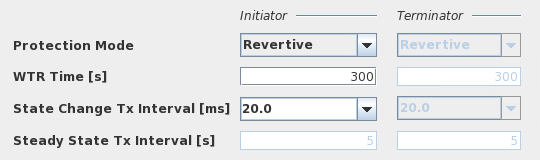
Allows you to define the notification frequency of the path state as well as the restoration actions once the working path is repaired or restored. The protection mode defines whether or not the traffic is switched back from protection path to the working path. There are two modes of operation:
− Revertive mode
The traffic is automatically switched from the protection path to the working path after the expiration of the Wait-to-Restore (WTR) timer.
− Non Revertive mode
The traffic is not automatically restored to the working path, even if the working path is repaired. Thus, administration form of intervention, i. e “Manual Switch” via FOXCST is needed to invoke restoration action.
This mode is employed if the administrator wants to gain assurances about the integrity of the path before switching path or if it is acceptable to continue operation without the (protection) path being protected.
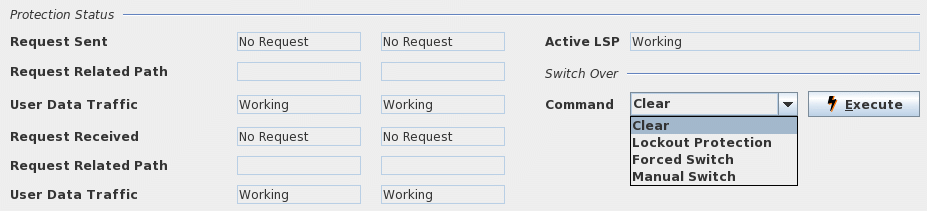
In addition this dialog also allows you to trigger manual switch-over commands on deployed tunnels and display the path protection status on deployed tunnels.

Please note:
For background information, please refer to sections OAM and BFD and Protection Mechanism, and to Tunnel Details - Path Protection.
Dialog image
Path Protection
Path Protection Status
Mandatory entries
Protection Mode
Optional entries
WTR Time
State Change Tx Interval
Informational content
Protection Status
Active LSP | Shows which LSP is used for transmitting suer data (Working or protection). |
Request Sent | Shows which switch-over command is sent from Initiator and Terminator nodes. |
Request Related Path | If the request sent is related to the working or protection path this is shown here (e.g. interruption of working path). |
User Data Traffic | Information sent to other node: Shows which path is carrying user data. |
Request Received | Shows which switch-over command is received from Initiator and Terminator nodes. |
Request Related Path | If the request received is related to the working or protection path this is shown here (e.g. interruption of working path). |
User Data Traffic | Information received from other node: Shows which path is carrying user data. |
Controls (buttons, menu items, etc.)
Protection Mode: Revertive | When the signal fail condition is no longer active and after the expiry of the wait-to-restore (WTR) timer, the user traffic is switched back from the protection LSP to the working LSP. |
Protection Mode Non Revertive | The user traffic remains on the protection LSP even if the signal fail condition is no longer active. |
WTR Time [s] | Wait-To-Restore time for the revertive protection mode in the range: - 0 to 720 s (default 300 s). The user traffic is switched from protection to working LSP only after the expiration of the wait-to-restore timer. While the WTR time is running, a “Maintenance Function Active” alarm is raised on the involved nodes. |
State Change Tx Interval [ms] | The time interval to send three protection state coordination (PSC) protocol packets when there is a state change, e.g. a defect. The possible values are: - 3.3 ms, - 10.0 ms, - 20.0 ms. |
Steady State Tx Interval [s] | The time interval to send the protection state coordination (PSC) protocol packets when there is no state change. |
Switch Over (Protection Status on deployed tunnels with protection enabled)
Command | Select the manual switch-over command that shall be executed when clicking the “Execute” command button. The following commands are available: - Clear; Upon clicking on “Execute” an active protection switching command is cleared. - Lockout Protection; Upon clicking on “Execute” the protection LSP is locked out from the protection process. - Forced Switch; Upon clicking on “Execute” a forced switch-over from the currently active LSP to the protecting LSP is done. Note: A forced switch-over to the protecting path causes the protecting path to be active whenever it is fault free. Upon a fault on the active protecting path, a switch back to the working path is done. When the fault on the protecting path is cleared, traffic is switched to the protecting path again as long as the forced switch request is active. - Manual Switch; Upon clicking on “Execute” a manual switch-over from the currently active LSP to the protecting LSP is done. Note: A manual switch-over to the protecting path causes the protecting path to be active if it is fault free. Upon a fault on the active protecting path, a switch back to the working path is done, and the manual switch request is cleared automatically. |
Execute | Command button to execute the protection switching command selected from the list of four available commands (Clear; Lockout Protection, Forced Switch, Manual Switch). |
Help
? Help | Calls the help viewer and opens this page. |
Table Sorting and Filtering/Export and Printing
Please refer to Table Sorter section for details.
Related dialogs / windows