
HQoS Constants
The “HQoS Profile” dialog is called from the ENP menu “Tools – HQoS Configuration Manager…”, and by selecting the “HQoS Constants” tab. This dialog tab is only available in Expert Mode.
Purpose
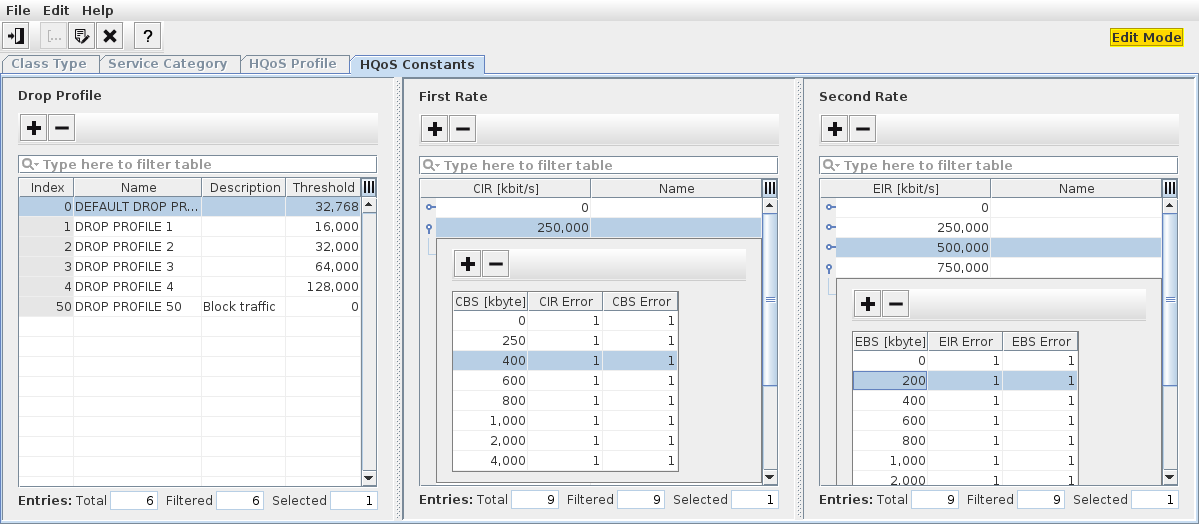
The main purpose of this feature is to provide current constants for “Drop Profile”, “First Rate”, and “Second Rate” settings used in the HQoS Configuration Manager. In the “Edit” mode, these settings can be modified, and drop profiles, first rates, and second rates can be added or removed.
Dialog image
HQoS Configuration Manager - HQoS Constants
Mandatory entries
Not applicable.
Optional entries
New drop profiles, first rates, and second rates can be added or removed, or their settings can be modified.
Informational content
Lists available drop profiles, first rates, and second rates.
Controls (buttons, menu items, etc.)
Edit HQoS Constants |  | Switch to edit mode to modify HQoS constants. While in edit mode, this is indicated by “Edit Mode” shown with amber background in the upper right corner of the HQoS Configuration Manager dialog window. |
Save |  | Save the modifications made to the HQoS constants. Only available in edit mode. You need to confirm that you want to save the modifications. |
Cancel |  | Exit edit mode without saving HQoS constants modifications. Only available in edit mode. You need to confirm that you want to cancel the modifications. |
Add (Drop Profile; First Rate; Second Rate) |  | Add a Drop Profile; First Rate; Second Rate to the respective list. Only available in edit mode. |
Remove (Drop Profile; First Rate; Second Rate) |  | Remove a Drop Profile; First Rate; Second Rate from the respective list. Only available in edit mode. |
Help |  | Calls the help viewer and opens this page. |
Exit |  | Quit HQoS Configuration Manager. |
Related dialogs / windows