
Spanning Tree Map
Purpose
Displays the Spanning Tree view of a selected NE with STP configured.

Please note:
For background information, please refer to section Rapid Spanning Tree Protocol (RSTP).
For Spanning Tree provisioning, please refer to section Spanning Tree Map Preconfiguration and Operation.
The tree is only built and shown over sections configured in Section Management. Missing sections will prevent showing the full tree.
Dialog image
Spanning Tree
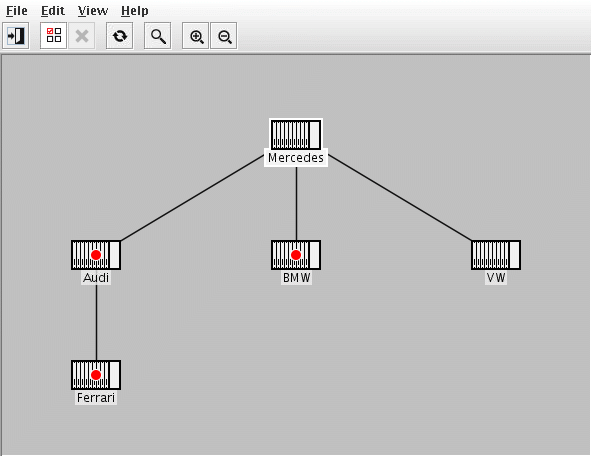
Mandatory entries
Select an NE from the Select NEs dialog.
Optional entries
Not applicable.
Informational content
• Bridge node
− All bridge nodes show the bridge name (the NE name known in FOXMAN‑UN). If the bridge has a port with status Blocking, this is indicated by a red circle marker.
− a tool-tip on the bridge node shows additional information of the bridge:
Bridge node (RSTP)
Name | The RSTP Bridge Name. Note: Currently “Customer Bridge” is the only bridge. |
Priority | The configured Local/Root bridge priority. |
Own MAC Address | The Local bridge MAC address. |
Root MAC Address | The Root bridge MAC address. |
Blocking ports | The slot/port# of ports which are in Discarding state. |
− a double click on bridge node opens the FOXCST of the corresponding NE with user class “Information”.
Note:
Verify that the FOXCST is defined in the “client_cst_doubleclick_default” parameter of /opt/nem/etc/cst.conf.
• Links
− Links are represented with dark gray lines between bridge nodes. Only links with forwarding endpoints are shown.
− a double click on a link opens the Section Manager and the section on which the link relies is shown.
− a tool-tip on the link shows additional information of the link end ports.
Link end ports
Port Roles | Shows the link end port’s role. Note: In RSTP, the port role is not applicable and will be shown as “N/A”. |
Priorities | Shows the configured port priority. |
Port State | Shows only the Forwarding port state (since only forwarding links are shown in the map). |
Path Cost | Shows the administratively assigned value for the contribution of this port to the path cost towards the spanning tree root. |
Controls (buttons, menu items, etc.)
File menu
Export as Image |  | Allows the currently opened spanning tree map to be exported from the FOXMAN‑UN system. The map image can be saved as GIF, JPEG or as PNG image file in a specified directory of the server. |
Exit |  | Quit Spanning Tree application. |
Edit
Select NE |  | Calls the Select NE dialog to start a new spanning tree detection. |
Cancel |  | Cancels current spanning tree detection. |
Refresh |  | Restarts spanning tree detection by re-reading the configuration and states of the nodes and ports and redraws the spanning tree using the previously selected node as starting point. |
View
Find Symbol |  | Finds a bridge in the spanning tree. |
Zoom In |  | Zooms into the spanning tree. |
Zoom Out |  | Zooms out of the spanning tree. |
Help
? Help | Calls the help viewer and opens this page. |
Related dialogs/windows