
Spanning Tree Map Preconfiguration and Operation
Preconfiguration via FOXCST
The RSTP parameters should be configured/provisioned via FOXCST.
Detailed information regarding provisioning are available at the following document:
− User Manual Ethernet Switching [1KHW028566].
Sample RSTP configuration via FOXCST
The spanning tree parameters configured via FOXCST are reflected in the FOXMAN‑UN spanning tree map. A sample FOXCST configurations of the node “Audi” are shown below:
1 From NEM Configurator, launch the FOXCST of the NE to be configured by selecting the context menu “Configuration > Manager”

3 Select “Spanning Tree” from the “Switching” tree on the left hand side of the FOXCST GUI.
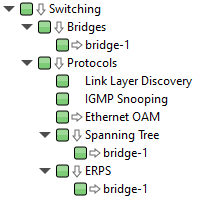
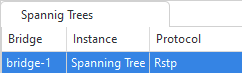
4 Select “bridge-1 Spanning Tree RSTP” from the list view on the right hand side of the “Switching tree”. This will preselect RSTP as the spanning tree protocol to be used on the NE.
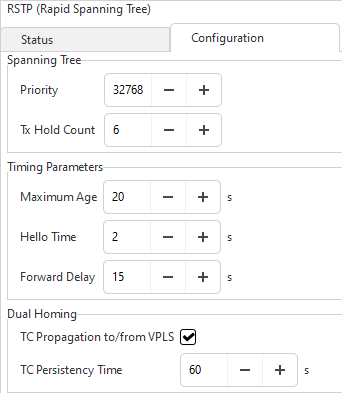
5 Select the “Configuration” tab to configure the RSTP settings. The default values are shown below:
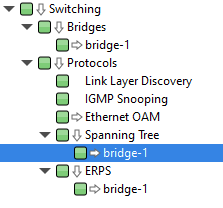
6 Select “bridge-1” from the tree view.
7 From the list of ports that support RSTP, you can now enable RSTP on all required switch ports by activating the “STP Enabled” checkbox.
Then click “Apply changes to the NE” icon  .
.
.8 Click on the “Configuration” tab for the selected port to configure “Priority” and “Path Cost”. The default values are shown below (if only STP is enabled but not R-L2GP):
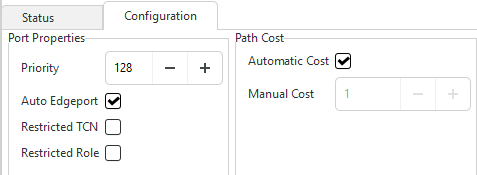
If R-2LGP is enabled, also the Pseudo Root Bridge MAC address and priority are shown, and Restricted Role is not available.
9 Click on “Apply changes to the NE” icon to check the current status of the Spanning Tree and selected port (see sample screenshots below).
to check the current status of the Spanning Tree and selected port (see sample screenshots below).
Please note:
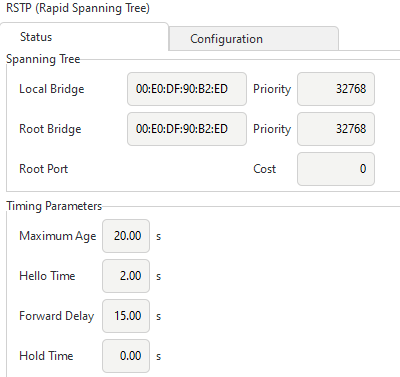
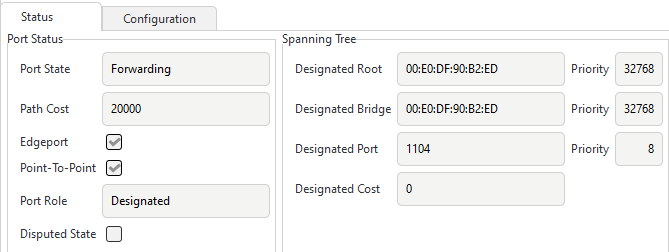
The screenshots below show the RSTP and selected port status of an NE.
• Designated Bridge/ Local Bridge:
The MAC Address of Local bridge.
• Designated Root/ Root Bridge:
The MAC address of Root bridge.
• Root Port:
The Local bridge’s port towards the Root bridge.
• Cost/Path Cost/Designated Cost:
The calculated cost from the Root bridge to the Local bridge.
− Priority (samples shown below):
The assigned Bridge priority (32768),
The assigned Port priority (8).
Preconfiguration via FOXMAN‑UN client
License
In order to enable the Spanning Tree application, the <STP> element of the license file “license.xml” should be enabled.
Section Management
The required sections/links between the bridge nodes should be provisioned in advance via FOXMAN‑UN Section Management application.
DAC
The available NEs depend on the domains assigned to the user. It is up to the FOXMAN‑UN administrator to choose the NEs for the user domains such that a meaningful spanning tree can be drawn.
Please note:
For detailed information, please refer to section Domain – Choose Members.
If some of the needed NEs are missing, then a spanning tree fragment will result, which is of very limited value.
Spanning Tree Map GUI Operation
1 Launch the Spanning Tree Map Application
NEM Desktop > Network > Spanning Tree
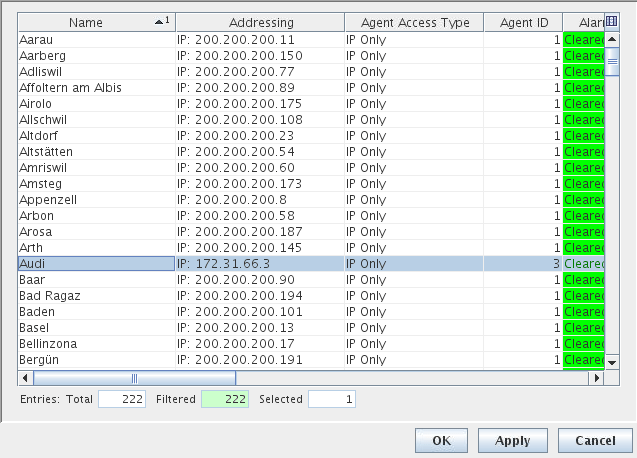
2 Select one of the RSTP configured NE, e.g. “Audi”, from the “Select NE” dialog.
Please note:
The STP Map application will request the selected NE for its STP information including the states and roles of its STP ports.
The STP Map application will then calculate the path from the selected NE towards the root bridge.