
NE – Create / Properties
Purpose
The Create NE and NE Properties dialogs are used to assign an NE to a particular agent or to modify an existing assignment.
Dialog image

Please note:
The Create and Properties dialogs are identical except for the not modifiable parameters presented at the top. “ID”, “Operational State”, and “Location” can only be displayed after the NE has been created and the configuration uploaded. “Location” is only applicable to FOX51x and FOX61x NEs and can only be entered or modified in the configuration of the NE via the local craft terminal (UCST or FOXCST).
Depending on the settings at creation time, only a part of the parameters can be changed in the NE Properties dialog.
Depending on the access rights of the current user, modifications may not be permitted in the NE Properties dialog.
Depending on the access rights of the current user, modifications may not be permitted in the NE Properties dialog.
For agents of type SNMP the maximum recommended number of NEs is 30. If you go beyond 30 NEs per SNMP agent, performance will be insufficient.
The image below shows a sample properties dialog for NEs of the type FOX615.
NE Properties: <NE_name>
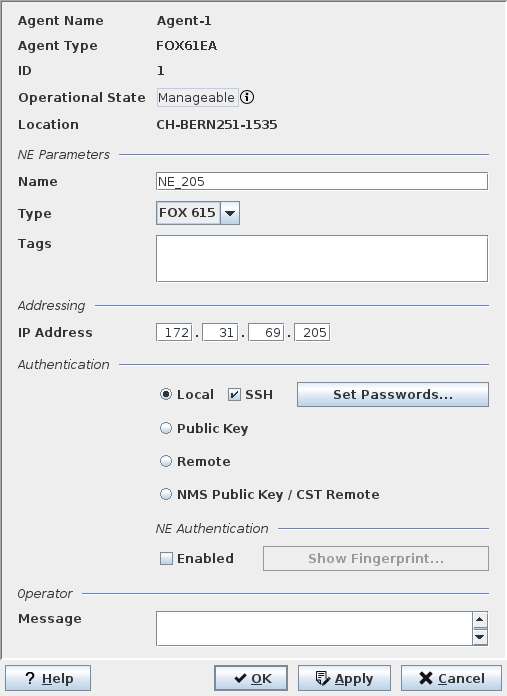
Mandatory entries (Create)
NE Parameters
Name | Must be unique within the whole FOXMAN‑UN application. |
Type | The selection available depends on the type of agent. The selected NE type automatically determines the type of addressing (e.g., IP or HDLC). For agent type “FO”, only NEs of type “Foreign Object” can be created. For FOX51x, if the wrong member of the family (e.g., a FOX515 instead of a FOX512) is selected, this will be modified automatically after upload of the configuration has been done. |
Tags | See Optional entries. |
Addressing
IP Address | Addressing for NEs using an Ethernet management interface. The address must be unique within the whole FOXMAN‑UN application. Not required for NE of type “FO”. |
HDLC Address | Addressing for FOX51x NEs using a serial management interface. The address must be unique within the agent that the NE is assigned to. The range is from 1 to 254, default is 1. |
Agent port | Applicable for SNMP devices only. Specifies the port where the agent of the SNMP device can be reached. |
HTTP port | Specifies the port where the agent can be reached. |
Authentication
Requires a selection of one out of four authentication types used to log in to the NE. Some parameters are applicable to specific NE types only.
Local | Authentication is using credentials stored locally on the NE. |
SSH | Use encrypted (SSH) connection to the NE. Only available with Local authentication. By default SSH is enabled. Enable or disable SSH for connecting to the NE by setting or removing the mark in the “SSH” checkbox. This option is not available for all NE types. SSH is always enabled (mandatory) for remote authentication or when using a public key. |
Set Passwords | See Optional entries. |
Public Key | Use a public key for connecting to the NE. When enabled, both FOXMAN‑UN and FOXCST use private/public key authentication for connecting to the NE. The public key is created in the NEM Remote Admin Tool via the “Manage Authentication Keys…” button. |
Remote | Enables the FOXMAN‑UN to manage NEs that have only RADIUS Authentication enabled. |
NMS Public Key / CST Remote | Use authentication keys managed by FOXMAN‑UN. For details see Manage Authentication Keys…. When enabled, FOXMAN‑UN uses private/public key authentication for connecting to the NE, while FOXCST uses RADIUS authentication. |
NE Authentication (separated group) | |
Enabled | Only available when “SSH” is enabled. When activated, the connection to the NE uses authentication with a fingerprint provided by the NE. When enabling NE Authentication, the NE gets unmanageable until the fingerprint is accepted. To accept it, close the dialog, force poll the NE and re-open the NE Properties dialog. Click “Show Fingerprint…”. |
Show Fingerprint… | Shows the fingerprint provided by the NE when “NE Authentication” is enabled. To accept the fingerprint click on “Accept”. This will paste the fingerprint to the “Configured Fingerprint” field. Click OK to apply the change. Force poll the NE. The operational state should go back to “manageable”. |
FO Parameters
Applicable for NEs of type “FO” only:
FO Key | Identifier for the FO. |
Location | Enter the location of the FO NE. |
Third Party EM
Applicable for NEs of type “FO” only:
Label | Application label to be shown for third party element manager application. |
Application | Path and executable for the third party element manager application. |
Option | Command option(s) to be applied for starting the third party application. |
HDLC Routing
Applicable for FOX51x NEs only:
IP Address | Must be unique within the whole FOXMAN‑UN application. Depending on the type of NE and the type of interface used for communication with it, either one or both HDLC Address and IP Address fields must be filled in. |
Port | Must be unique within the whole FOXMAN‑UN application. The range is from 1024 to 65535, default is 20736. |
Settings
Applicable for SNMP devices only:
Poll Priority | Controls the polling interval for SNMP devices in five stages (highest, high, medium, low, lowest). Default is “medium”. |
Call Timeout | Defines the time the agent manager is waiting for an answer to a normal request. Range is 1 to 60 seconds. Default is 2 seconds. |
Call Auto Retries | Defines the number of automatic retries after a normal request has failed. Range is 0 to 9. Default is 0. |
Bulk Call Timeout | Defines the time the agent manager is waiting for an answer to a bulk request. Range is 1 to 60 seconds. Default is 5 seconds. |
Bulk Call Auto Retries | Defines the number of automatic retries after a bulk request has failed. Range is 0 to 9. Default is 0. |
Optional entries
Tags | Free alphanumeric text, e.g. to specify the function of the NE. |
Set Password | If a password for the NE is different from the default password, it must be entered here. Otherwise the NE cannot be accessed by FOXMAN‑UN. The button calls the Set Password(s) dialog. Not available with remote authentication or when using a public key. Note: If a password is added, deleted or modified via CST GUI in FOXMAN‑UN, the NE must be deleted and created again with the new password. |
SNMP Security Profile Name (SNMP devices) | This dialog assigns an existing SNMP security profile to a SNMP NE. |
Operator Message | A message, e.g. containing instructions can be added. Its presence is indicated by an asterisk in front of the NE name on maps. It can be viewed and modified from there via the context menu. |
Informational content
The NE Properties dialog initially displays the currently valid parameters.
NE Properties, general
Agent Name | Name of the agent communicating with the NE. |
Agent Type | The agent type depends on the nodes it can communicate to and on the supported protocol(s). The available agent types depend on license options. |
ID | The assigned ID of the NE in the NEM Configurator. |
Operational State | Shows whether the NE is “Manageable” or “Not manageable”. This information is read-only. This is the same information as shown in the NEM Configurator as “Operational State”. In case of an unmanageable NE, the most probably cause is given when hovering over the (i) sign with the mouse pointer. |
Location | The location of the NE as configured via the local craft terminal. |
Controls (buttons, menu items, etc.)
? Help | Starts the FOXMAN‑UN help viewer and opens this page. |
OK | Applies the modifications and closes the dialog. |
Apply | Applies the modifications without closing the dialog. |
Cancel | Closes the dialog without applying the modifications. |
Related dialogs / windows
Create Agent / Properties dialog,