
NE – Set Password(s)
Purpose
FOXMAN‑UN must be aware of any NE passwords different from the defaults for the user classes “Manager”, “Session Manager” (Session), “Maintenance”, and “Information”. Only then the NE can be accessed via FOXMAN‑UN, thus enabling automatic supervision and access via CST. The “Set Password” dialog serves to enter such passwords.
Dialog image
Set Passwords
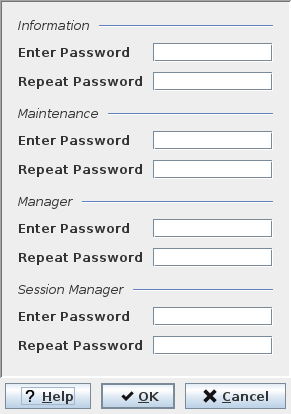
Mandatory entries
Not applicable.
Optional entries
Passwords need to be entered only if they are different from default. For information on default passwords refer to the relevant section in the User Manual “FOXMAN‑UN under Linux”.
Depending on the NE family, either only the password for “manager” or all passwords are relevant. In the dialog, all not relevant passwords are grayed out.
Passwords must be entered twice. If the two entries do not match, an error message is generated on leaving the dialog.

Please note:
If passwords different from default are used, at least the password for the user class “manager” and, if applicable, for “information” must be entered to enable automatic supervision by FOXMAN‑UN and connection via CST. If applicable, the other passwords have to be entered if CST access for the corresponding user classes is required.
Informational content
Not applicable.
Controls (buttons, menu items, etc.)
? Help | Starts the FOXMAN‑UN help viewer and opens this page. |
OK | Applies the modifications and closes the dialog. |
Cancel | Closes the dialog without applying the modifications. |
Related dialogs / windows
NE – Create / Properties dialog.