
Create Agent / Properties
Purpose
The Create Agent and Agent Properties dialogs are used for configuring “Element Agents” in the FOXMAN‑UN database. Each agent handles the communication to a number of associated NEs over the management network. Specialized agent types, such as FOX61x, FOX51x, FO (Foreign Object) are used to cater for the different types of NEs.
After an agent has been created, NEs of the appropriate type can be assigned to it via the NE – Create / Properties dialog.
Depending on the access rights of the current user, modifications of the agent parameters may not be permitted in the Agent Properties dialog.

Please note:
A newly created agent is started automatically. It can be stopped or started manually using the command “Stop Agent” or “Start Agent” in the context menu.
Dialog image
Please note:
Apart from the Agent ID which is automatically assigned and only displayed in the Agent Properties, both dialogs are identical. Depending on the existing configuration and the access rights of the current user, not all parameters may be changed in the Agent Properties dialog.
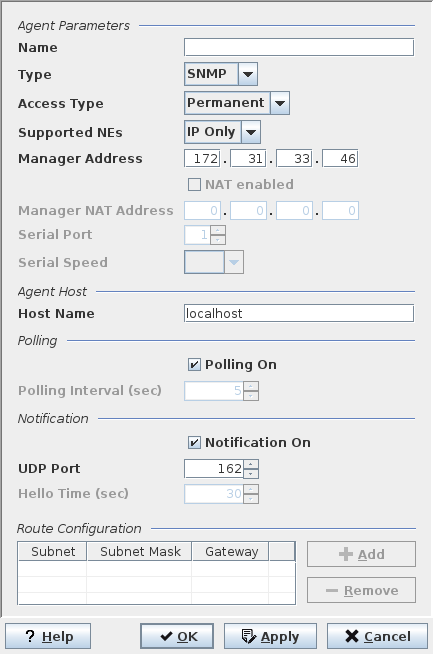
Mandatory entries
Please note:
Depending on the selection for some parameters, the selection for other parameters is reduced, they are given default values or access to them is blocked (entry fields grayed).
Agent Parameters
Name | A unique name, preferably describing the part of the network that is being handled. |
Type | The NE families supported by FOXMAN‑UN require appropriate types of agents. NEs belonging to different families of NEs cannot be assigned to the same agent. The combo box shows the NE families available for the current FOXMAN‑UN installation. The selectable NE families depend on license options. In addition to agent types for NE families, the following agent types are available: - SNMP - FO |
Access Type | Defines the access type to the management network. |
Supported NEs | “IP only” accepts only NEs with an Ethernet management interface. “HDLC only” accepts only NEs with an serial management interface. “Any” supports both the above types. |
Manager Address | The IP address of the agent. This address is used by the NEs to send their notifications to. Only valid for non-serial communication interfaces. Note: In a distributed installation this may not be the address of the machine where the FOXMAN‑UN core is installed. |
NAT enabled | Indicates whether Network Address Translation shall be used or not. |
Manager NAT Address | If NAT is enabled, this is the translated IP address. |
Serial Port | If a serial communication port is used (Access Type set to a serial type like RS-232 or similar) this identifies the serial port number on the core machine. |
Serial Speed | The speed of the serial port (in baud). |
Agent Host
Host Name | The workstation name where the agent process has to run. This only needs to be modified from localhost in distributed systems where an agent runs on a different machine than the NEM core and database. |
Polling
Not applicable for FOX61x agent.
Polling On | Polling of all the NEs assigned to this agent can be disabled (e.g. for commissioning or fault finding purposes). |
Polling Interval (sec) | The rate at which assigned NEs are polled. The range is from 1 to 10000 seconds, default is 5. Note 1: If only NEs supporting notification are managed, the polling interval can be made quite large (e.g. 30 seconds). Where notification is not supported, the interval should be as short as possible to keep the delay in reporting alarms low. If using terminal servers, the interval has to be set to a minimum of 5 seconds. If using large SIFOX EOC networks, the interval has to be adapted accordingly. Note 2: The polling interval for SNMP devices is not set here. It is controlled through the parameter “Poll Priority” for each of the assigned SNMP devices individually – see NE – Create / Properties. |
Notification
Notification On | Can only be activated for agent type “Permanent”. Enables the NE to send messages to FOXMAN‑UN that its alarm state or configuration have changed, that the hello time has expired or that a reboot has occurred. |
UDP Port | The port the agent 'listens' at for notification messages. Port number must be in the range 1024 to 65535. Default is 20736. (UDP = User Datagram Protocol). Note: For SNMP and FOX660 agents this is the trap/inform port where devices are expected to send their traps/informs to. Make sure your devices are set-up correctly. |
Hello Time (FOX51x NEs only) | Time interval at which a FOX51x NE has to send a Hello notification. If no Hello message arrives for twice the interval time, FOXMAN‑UN sets the polling state of the NE to “Unmanageable”. |
Route Configuration
Subnet | Destination subnet of the route. |
Subnet Mask | Mask for the destination subnet. |
Gateway | IP address via which the destination subnet can be reached. |
Please note:
If you are using a Main/Standby setup (i.e. FOXMAN‑UN server redundancy provided via the NEM Remote Admin Tool), agent routes properties stored in the database backup on the main server are unsuitable for the standby server. It is therefore strongly recommended to use native Linux routes for this purpose in main server and standby server instead of agent routes.
Optional entries
NAT Enabled | Enables/Disables the Manager NAT Address. This is applicable to FOX61x, FOX660 agents only. |
Manager NAT Address | The NAT Device IP address for the agent. If NAT is enabled, this IP address will be used by the NEs to send their notification events to. |
Informational content
When calling the dialog, the route list shows all presently active routes.
Controls (buttons, menu items, etc.)
Route Configuration
Add | Calls the dialog for entering subnet, netmask, and gateway address. |
Remove | Deletes the route selected in the route list. |
? Help | Starts the FOXMAN‑UN help viewer and opens this page. |
OK | Applies the modifications and closes the dialog. |
Apply | Applies the modifications without closing the dialog. |
Cancel | Closes the dialog without applying the modifications. |
Related dialogs / windows
Not applicable.