
Create NE of type “FO” / FO Properties
Purpose
The “Create FO” and “FO Properties” dialogs are used to define an NE of type “Foreign Object” (FO).
FOs are used to represent third party network elements or other equipment. They can represent interface objects to other networks such as switches, bridges, routers, and other types of access multiplexers from other manufacturers. They can also stand for door contact monitoring, power supply supervision etc.
From FOXMAN‑UN R16B onwards they are defined as NEs and can be handled as NEs.
An FO initially has no alarm. However, alarms from different sources can be re-directed to a FO, so that the FO represents the alarming state of these sources. The sources of alarms redirected to FO may be:
− the inputs of ALCAR in FOX51x,
− any alarm from FOX61x,
− inputs from FOX61x chassis.
Depending on the access rights of the current user, modification of the FO parameters may not be permitted in the FO Properties dialog.

Please note:
The “Create Foreign Object” dialog is reached via the “Create NE…” context menu of an “FO Agent” item in the NEM Configurator tree panel.
The “NE Properties” dialog is reached via the context menu of any FO in the details panel.
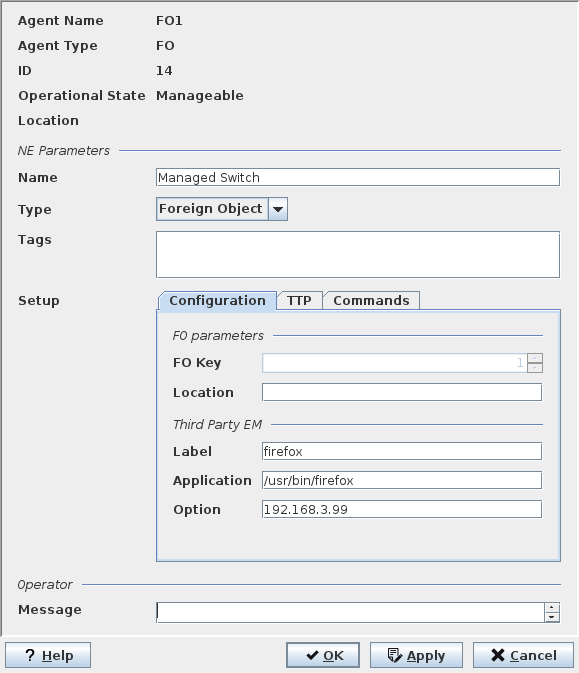
Dialog image
Please note:
The “FO Properties” dialog is different from the “Create Foreign Object” dialog in
• the FO Key which cannot be modified after creation,
• the ID, which is automatically assigned during creation, and
• the Operational State, which is determined after creation.
After creation, there are also the “FO Properties” options to add, remove, and operate remote commands of an FO, provided the FO supports remote commands.
Create NE of type “Foreign Object” on Agent of type “FO” with Tab “Configuration”
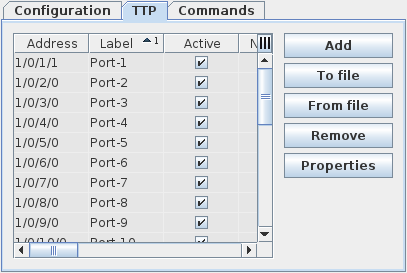
Tab “TTP”
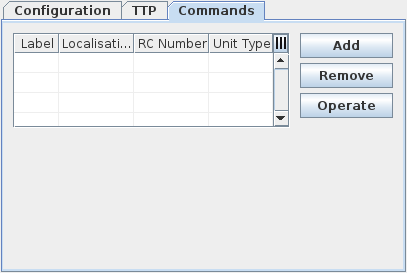
Tab “Commands”
NE Properties
NE Parameters group: | |
Name | The given name must be unique within all defined Foreign Objects. |
Type | Foreign Object |
Tags | Free alphanumeric text, e.g. to specify the function of the FO. |
“Setup” group, with tabs “Configuration”, “TTP” and “Commands” (the latter being available only after creation): | |
Configuration tab: | |
FO Parameters group: | |
FO Key | Select FO Key (identifier). |
Location | Free alphanumeric text, e.g. to indicate the physical site. |
Third Party EM group: | A third party Element Manager associated with the FO can be entered directly in the “Application” field. This application has to be installed previously. The name specified in the “Label” field will appear in the “Activate” item of the FO context menu on a map (see Main Window of the NEM Network Browser). The default label is the name of the application. The specified third party EM can be started directly from the context menu of a FO in a map. The “Option” field allows passing parameters to the application. The following predefined parameters are provided: %N FO name %L FO location %I FO Identity %K FO Key |
Label | A name for the third part EM to be opened. The name will appear in the context menu of the NE in the NEM Configurator. |
Application | Path to the executable third party application. |
Option | Option to be added when calling the third party application. |
TTP tab: | |
TTP table | Table to add Trail Termination Points (TTP). Adding Trail Termination Points offers the possibility of using sections between Foreign Objects and NEs in the network maps. Some of the settings use defaults that cannot be changed. These settings are used to provide enough configuration details for using the TTPs in NP. The table, provides the following columns: |
Address | Port identifier of the individual TTP. |
Layer Rate | Can be any of the following: - STM1 PMS - STM4 PMS - STM16 PMS - STM64 PMS - E0 - E12 - E22 - O22 - E31 - E32 - E-DSL - E-SHDSL - ADSL Line - E-VDSL - CSMACD Ethernet - OTU1 - OTU2 - OTU2e - OTU3 - OTU3e2 - OTU4 - Clock Distribution - Unknown |
Label | Label can be entered as required. |
Active | If true, the TTP is active. If false, the TTP is inactive. |
Port Type | Can be any of the following: - Ext. electrical - Ext. optical - Ext. radio |
Number of 64k / Num 64k | Specifies the number of timeslots in TDM structured signals. |
Has CAS | If true, the structured signal has Channel Associated Signaling CAS. If false, the signal does not have CAS. |
[Support] CAS in Last TS | If true, the structured signal supports CAS in its last timeslot. If false, the signal does not support CAS in its last timeslot. |
Connection Type | Type of connection on the TTP. |
Unit Type | Default is “FO-UNIT”. |
Connected Channels Must Match | If true, the structure of connected channels must match. If false, the structure of connected channels doesn’t need to match. |
Protection | Default is “No Protection, Revertive: false, Same channel: false, SNCPI: false”. |
Sector | Default: “0”. |
Dynamic Channel Allocation | Default: false. |
Commands tab (not available during NE of type “FO” creation but only in NE of type “FO” properties): | |
Add | Calls the Create Remote Command dialog. |
Remove | Deletes the selected remote command in the list. |
Operate | Execute/Send remote command to the 3rd party device connected to the selected remote command port. The following remote commands are provided: - Set output to “ON” State, - Set output to “OFF” State. |
Operator group: | |
Message | A message, e.g. containing instructions can be added. This message can later be modified by any FOXMAN‑UN user having access to it. |
Informational content
Remote Command
Label on FO | Text representing the “Label on FO” created via the Create Remote Command dialog. |
Localisation | NE-ID/unit slot number. |
RC Number | Remote Command Number (n=1 to n=6). |
Unit | The unit with the created/configured RC. |
Label on Unit | The label used on the respective unit. |
Controls (buttons, menu items, etc.)
TTP
Add | Calls the TTP – Create / Properties dialog. |
To file | Lets you store the properties of a TTP in a file for later use. The button calls the standard file save dialog. |
From file | Lets you retrieve the properties of a TTP from a file. The button calls the standard file open dialog. |
Remove | Deletes the TTP selected in the list. |
Properties | Calls the TTP – Create / Properties dialog for a selected TTP. |
General
? Help | Starts the FOXMAN‑UN help viewer and opens this page. |
OK | Applies the modifications and closes the dialog. |
Apply | Applies the modifications without closing the dialog. |
Cancel | Closes the dialog without applying the modifications. |
Related dialogs / windows
Configuration of FO alarms and commands in ALCAR.