
Task Management
Purpose
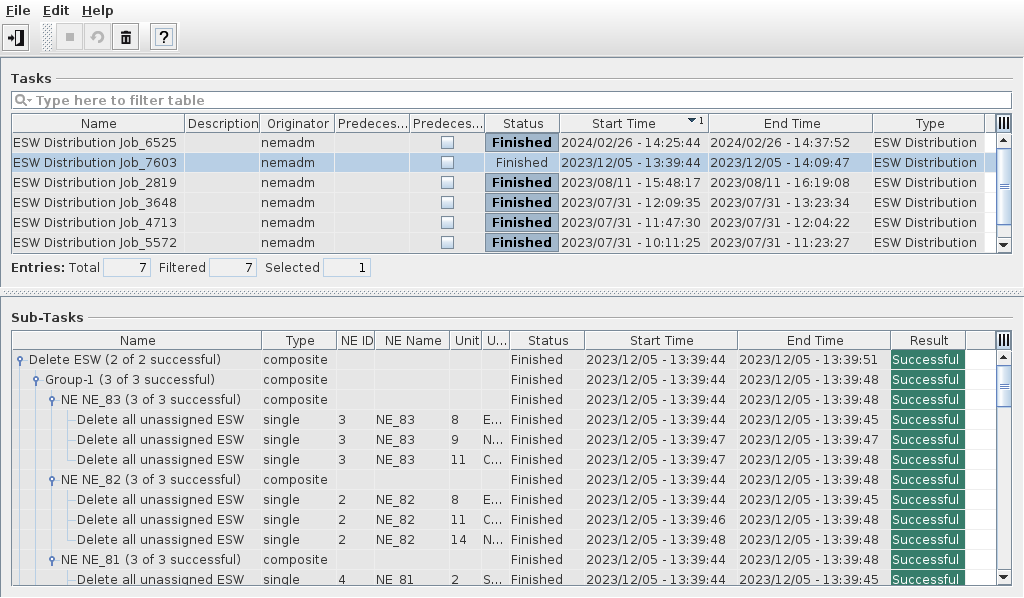
This dialog window shows a list of all tasks related to ESW distribution. Tasks can be retried, aborted or deleted depending on their status, and task details can be displayed.
Finished or aborted tasks can be deleted, provided the FOXMAN‑UN user has the required access rights.
Tasks have sub-tasks, for which a detailed list is displayed in the lower part of the dialog window.
Dialog image
Task Management
Mandatory entries
None.
Optional entries
None.
Informational content
Tasks: | |
Name | Name of the task. |
Description | Task description |
Originator | User name of the user having defined the task. |
Predecessor Task | Name of the defined predecessor task. The predecessor task is or was due for execution before the execution of the selected task. |
Predecessor Task must succeed | True or false. |
Status | Status of the task (Scheduled, Running, Finished). |
Start Time | Date and time at which the task has started. |
End Time | Date and time at which the task has ended. |
Type | The task type (ESW Distribution). |
Sub-Tasks: | |
Name | Name of the sub-task. This name is automatically composed of available task definition details. |
Type | Type of the sub-task (single, composite). Sub-tasks on level 4 are single tasks. |
NE ID | ID of the involved NE. |
NE Name | Name of the involved NE. |
Unit ID(s) | Slot of the involved unit. |
Unit Name | Name of the involved unit. |
Status | Status of the sub-task. |
Start Time | Start time of the sub-task. The start time of each sub-task is individually recorded. Not available for scheduled tasks. |
End Time | End time of the sub-task. The end time of each sub-task is individually recorded. Not available for scheduled tasks. |
Result | Result of the sub-task execution (successful, failed). |
Controls (buttons, menu items, etc.)
Menu “File”
Exit |  | Closes the current dialog window. |
Menu “Edit”
Abort Task |  | Aborts a running task. |
Retry Task |  | Retries to run an aborted task. |
Delete Task(s) |  | Deletes selected task(s). Requires confirmation before deletion is executed. A deleted job is removed from the list of jobs. |
Context menu on selected task
Show Task Details… | Calls the “Task Details” window to display details of the selected task. |
Context menu on selected sub-task
Show Sub-Task Details… | Calls the “Sub-Task Details” window to display details of the selected sub-task. |
Menu “Help”
? Help |  | Calls the FOXMAN‑UN help viewer and opens this page. |
Dialog image
Task Details
Mandatory entries
None.
Optional entries
None.
Informational content
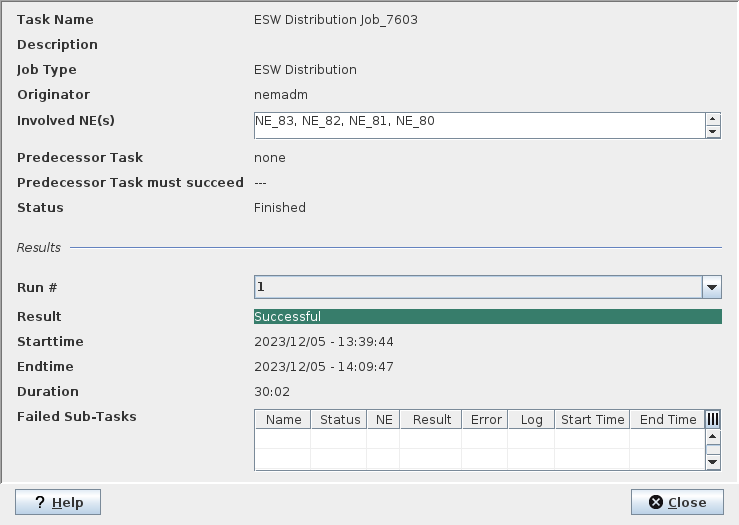
Task Details: | |
Task Name | Name of the task. |
Description | Task description. |
Originator | User name of the user having defined the task. |
Involved NEs | IDs of the NEs involved in the task execution, separated by commas. |
Predecessor Task | Name of the defined predecessor task, or “none”. The predecessor task is or was due for execution before the execution of the selected task. |
Predecessor Task must succeed | “true” or “false” if a predecessor task is defined. “---” if no predecessor task is defined. |
Status | Status of the task (Scheduled, Running, Finished). |
Results: | |
Run # | Shows how many times the task has run. Empty if not run yet. |
Result | The result of the last run (Successful, Failed). Empty if not run yet. |
Starttime | Date and time when the task last started. Empty if not run yet. |
Endtime | Date and time when the task last finished. Empty if not run yet. |
Duration | Execution duration of the task during the last run. Empty if not run yet. |
Failed Sub-Tasks | Lists failed sub-tasks in a table with information on - Name, - Status, - NE, - Result, - Error, - Log, - Start Time, - End Time. |
Controls (buttons, menu items, etc.)
? Help | Calls the FOXMAN‑UN help viewer and opens the Task Management page. | |
Close | Closes the dialog window. |
Dialog image
Sub-Task Details
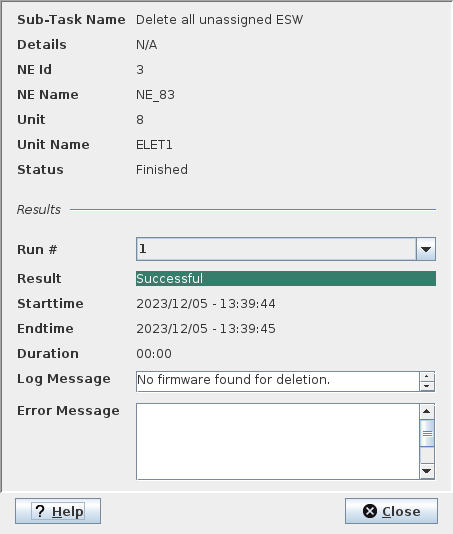
Details for level-4 entries:
Mandatory entries
None.
Optional entries
None.
Informational content
Sub-Task Details: | |
Sub-Task Name | Name of the sub-task. The sub-task is a level-4 entry in the list of sub-tasks of the Task Management dialog window. |
Details | Details of the sub-task, if available. |
NE Id | ID of the NE affected by the sub-task execution. |
NE Name | Name of the NE affected by the sub-task execution. |
Unit | Slot(s) of the unit(s) affected by the sub-task. |
Unit Name | Name of the unit(s) affected by the sub-task. |
Status | Status of the sub-task (Scheduled, Running, Finished). |
Results: | |
Run # | Shows how many times the task has run. Empty if not run yet. |
Result | The result of the last run (Successful, Failed). Empty if not run yet. |
Starttime | Date and time when the task last started. Empty if not run yet. |
Endtime | Date and time when the task last finished. Empty if not run yet. |
Duration | Execution duration of the task during the last run. Empty if not run yet. |
Log Message | If applicable, shows a message related to the task execution. |
Error Message | If applicable, shows a message related to error(s) that have occurred during task execution. |
Controls (buttons, menu items, etc.)
? Help | Calls the FOXMAN‑UN help viewer and opens the Task Management page. | |
Close | Closes the dialog window. |
Related dialogs / windows