
Job Management
Purpose
This dialog shows a list of all jobs such as ESW or SSH keys distribution, regardless of their status. Jobs can be edited, deleted, and copied. Jobs are the basis (template) for related tasks.
Dialog image
Job Management
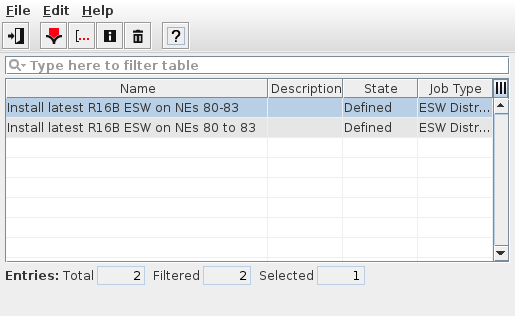
Informational content
General information: | |
Name | Name of the job. The job name is determined during the definition of the job in the Distribution Wizard. |
Description | Description entered as “Job Description” when creating the job. |
State | Current state of the job, see Distribution Wizard. |
ID | Job ID; this column is hidden by default. |
Job Type | Shows the type of the job; possible options depend on feature availability. |
Controls (buttons, menu items, etc.)
Menu “File”
Exit |  | Closes the current dialog window. |
Menu “Edit”
Copy Job |  | Creates a copy of the selected job. The copy gets the name of the original job, complemented with “_clone” and a number starting from 1. The copy will have “Draft” state and can be edited and activated in the wizard. |
Edit Job |  | Edit a job. This will open the Distribution Wizard, which allows you to edit the job name and its further properties, and to activate the job. Editing is possible for activated jobs if the corresponding task has not been executed yet, or if a job has “Draft” state. Jobs with scheduled tasks can be edited, but, their related task will be deleted and replaced by the task resulting from the modified job properties. Jobs with corresponding tasks that are running or have already finished cannot be edited. |
View Job |  | Shows job details in a separate window, see View Job. |
Delete Job(s) |  | Deletes selected job(s). Requires confirmation before deletion is executed. A deleted job is removed from the list of jobs. |
Menu “Help”
? Help |  | Calls the FOXMAN‑UN help viewer and opens this page. |
Related dialogs / windows