
Network Overview
Purpose
This dialog provides an overview of Embedded Software in the managed network(s) in different tabs. Each of the tabs shows its specific list of items. The lists can be expanded and collapsed.
When collapsed, the tabs list the following information in the column “Network Element”:
• ESW (tab):
In the collapsed view, lists all ESW installed in the network, with the applicable number of NEs and units having the ESW installed.
• Units (tab):
In the collapsed view, lists all Units installed in the network, with the number of NEs and units having the ESW installed.
• Network Elements (tab):
In the collapsed view, lists all NEs in the network having installed ESW, with the number of units having the ESW installed.
• System Releases (tab):
In the collapsed view, lists all system releases installed in the managed network(s). In brackets you will find the number of items of the child category (NE).
When expanded, each of the lists in the tabs described above show the following additional information:
− Network Element (Name),
− NE Type,
− NE Release,
− Unit,
− HW Name,
− HW Version,
− SW Version,
− Configuration Description,
− Installed Memory,
− Free Memory,
− Manufacturer S/N,
− NE ID,
− Bootloader Version.
It also provides a function to delete unused ESW files. Unused ESW files are available on some units in the network, but are not used currently. It is up to the operator to decide whether or not to delete them. When deleting these files, more space is made available in the memory of the respective units in the network.
Dialog image
Network Overview
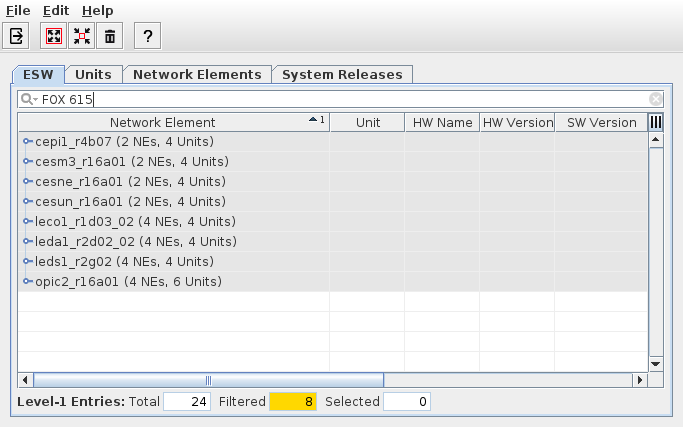
Informational content
List of all Embedded Software (ESW) installed in the network. The lists are grouped in three tabs:
• ESW, lists all ESW found in the network (name and version, number of NEs and units),
• Units, lists all unit names found in the network (unit name, number of NEs and units)
• Network Elements, lists all NEs found in the network (NE name, number of units)
• System Releases, lists all system release IDs found in the network (System release ID, number of NEs with ESW of the system release installed).
Each of the entries in the lists can be expanded / collapsed. When expanded, additional information is shown for each of the expanded entries.
Controls (buttons, menu items, etc.)
Menu “File”
Exit |  | Closes the current dialog window. |
Menu “Edit”
Expand All |  | Expands all table entries to show more details. |
Collapse |  | Collapses all table entries to show basic information only. |
Delete unused ESW |  | Opens the “Delete Unused ESW” dialog window. The window will display ESW (with ESW name and version, and the related system release if appropriate) found to be unused in the network, i.e., not used on any of the nodes. You can select one or several of the ESW entries and delete theses ESW files from the NEM database by clicking the “Delete” button. You can close the dialog window via the “Close” button. |
Menu “Help”
? Help |  | Calls the FOXMAN‑UN help viewer and opens this page. |
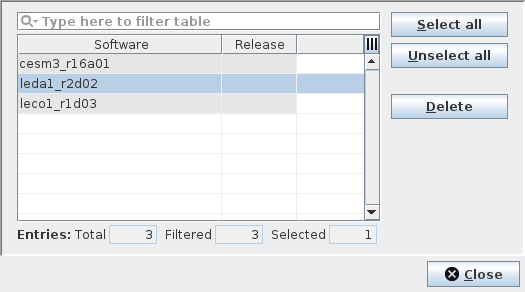
Dialog image
Delete Unused ESW

Please note:
When opening the dialog, all ESW that has been added to the NEM database and is not known to be used (i.e., not assigned or running) in the network is listed and can be selected for deletion. When deleting a selected ESW, it is removed from the Element Manager, i.e. from the NEM database. This will decrease the space required for the NEM database.
To get deleted ESW back to the NEM database in case it is still used on an NE which was not available in the network when deleting the ESW, it can be manually uploaded from the NE using the FOXCST, or it is automatically uploaded when connecting to the NE via FOXCST.
To remove unused ESW in the network, use the Distribution Wizard.
Informational content
List of all Embedded Software (ESW) found unused in the network.
Software | Shows the ESW name and version of the unused ESW found in the network. | |
Name | The name of the ESW (in capital letters). | |
Revision | The revision of the ESW (in capital letters). | |
System Releases | If the ESW can be unambiguously assigned to a specific system release or to specific system releases, the system release(s) is (are) shown here. |
Controls (buttons, menu items, etc.)
Select all | Selects all entries in the list. | |
Unselect all | Deselects all entries in the list. | |
Delete | Deletes the selected ESW from the NEM database. The execution of the delete command must be acknowledged by the user. Successful deletion is indicated by a confirmation message. Deleted ESW will be removed from the list. ESW belonging to a system release will be removed from that release, i.e., they will no longer be part of the respective imported system release and hence not be available for ESW distribution unless the system release ESW package is imported again. | |
Close | Closes the dialog and returns to the “Network Overview” dialog. |
Related dialogs / windows