
Transport Entity (New/Modify)
Purpose
This dialog is called from the Application dialog Edit menu.
The dialog is used to create new Transport Entity (TE) or modify an existing TE.
It is used to specify characteristics of a Transport Entity consisting of:
− TE Name
− Type: Trail, SNC or Circuit
− Layer rate, which is defined by the Type.
− Direction: unidirectional or bidirectional
− The Endpoints NEs (a End NE and z end NE)
− The Endpoints of unit location on Endpoint NEs (a End TP and z End TP)
Dialog image
New TE [Section Name]
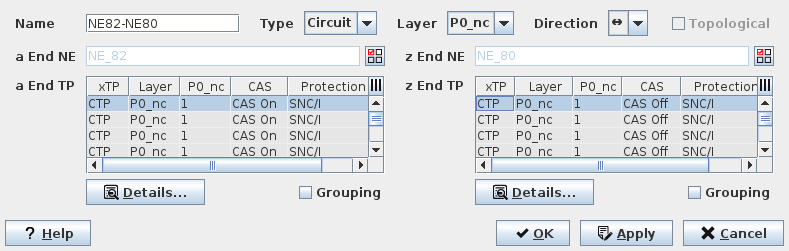
Mandatory entries
− Type
− Layer
− Direction
− a End NE/TP
− z End NE/TP
Optional entries
− change the default Name
− Details
− Grouping
Informational content
All presently configured characteristics of the new Transport Entity.
Controls (buttons, menu items, etc.)
Name | Any string to help identify the new Transport Entity. | |
Type | Possible entries are Circuit / Trail / SNC. | |
Layer | Only a possible layer rate for each Transport Entity type can be selected. | |
Direction | Possible entries are Unidirectional ( -> ) or Bidirectional ( <-> ). | |
Topological | Indicates if the Trail is “Topological”, i.e. if its extremities are linked with a cable (electrical or optical). | |
a End NE z End NE |  | Calls the Select NE dialog to select the A End NE/Z End NE. |
a End TP z End TP | a End/Z End Termination Point (TP) Browser table Note: The TP of the selected NE will automatically appear on the TP Browser table | |
Details… |  | Calls the TTP Trail Termination Point dialog for the selected TP label. |
Grouping | When more than one Endpoint is selected, Each Endpoint will be used as extremity for Circuit. When the checkbox is selected, the NP will group selected endpoints to create one TE. | |
? Help | Calls the FOXMAN‑UN help viewer and opens this page. | |
OK | Applies the modifications and closes the dialog. | |
Apply | Applies the modifications without closing the dialog. | |
Cancel | Closes the dialog without applying the modifications. |
Table Sorting and Filtering/Export and Printing
Please refer to Table Sorter section for details.
Related dialogs / windows