
TTP Trail Termination Point
Purpose
This dialog is called from the Transport Entity (New/Modify) dialog via the “Details…” button.
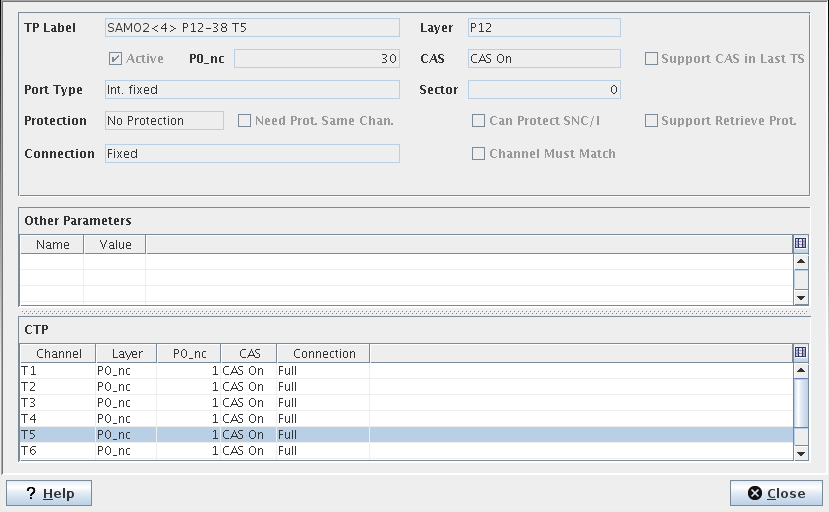
The dialog is used to provide physical characteristics of a TTP. This is a read-only dialog, no modification can be made to the displayed information. Those configuration parameters can be modified in the NE configuration using the CST.
Dialog image
TTP
Mandatory entries
Not applicable.
Optional entries
Not applicable.
Informational content
TTP attributes are:
− TP Label,
− Layer,
− Active,
− P0_nc (in case of TTP with P0 channels),
− CAS (On or Off),
− Support CAS in Last TS (TS = timeslot),
− Port Type,
− Sector,
− Protection,
− Need Protection Same Channel,
− Can protect SNC/I,
− Support Revertive Protection,
− Connection,
− Channel Must Match,
− Other parameters (name and value list),
− CTP list (Channel, Layer, P0_nc, CAS, Connection).
Controls (buttons, menu items, etc.)
? Help | Calls the help viewer and opens this page. |
Close | Closes this dialog. |
Table Sorting and Filtering/Export and Printing
Please refer to Table Sorter section for details.
Related dialogs / windows