
NEM Login
Purpose
The NEM login dialog and related dialogs (Host Manager, NEM Remote Admin Tool) allow you to set up one or several core servers, including server redundancy.
Server redundancy is based on a main/standby principle. Main and standby servers are paired with each other. In case of a main server failure, the standby server is either automatically activated (with warm standby) or manually activated (with cold standby).
Once the server setup is completed, the NEM login will start the NEM desktop and connect it to the NEM core. In order to connect to a specific host for the first time you need to accept the server certificate presented in a “SSL Certificate Verification” dialog.
Dialog image
NEM Login
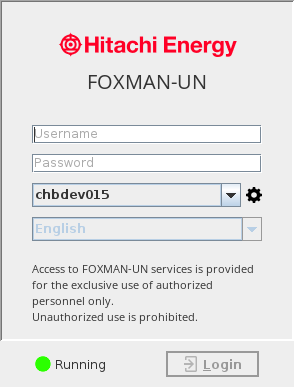
Mandatory entries
Username | Must be a username defined in the security section of FOXMAN‑UN; see “Role Based Access Control” (legacy) and “User and Role Management” (Web UI). | |
Password | The password assigned to the entered user name. | |
Host (server) selection | From a drop-down list, select the NEM server to connect to. To manage server connections and Main/Standby servers, click the “settings” icon. Note: When a main / standby setup has been defined, the server name is complemented with its role (Main, Warm Standby, or Cold Standby). To configure a main/standby setup, call the Host Manager via the Settings icon. Note: When logging in on a server with the client installed, the local server is listed as default. | |
Settings |  | Calls the Host Manager dialog. Required for initial setup of hosts to connect form the client. |
Language | Select the GUI language if any language pack is installed. Default language is English. A specific language pack is required for any language other than English. | |
Login | If connecting to a specific host for the first time, opens the “SSL Certificate Verification” dialog: - You need to accept the certificate by clicking the “Yes” button if you want to proceed. When accepting the certificate, you will be logged in to the selected host with the username and password entered. - If you press the “No” button, login will be rejected, and the dialog will be presented again upon the next login attempt. Otherwise, connects to the selected NEM Server and starts the NEM Desktop, provided you have entered a valid user name and password. | |
Optional entries
Not applicable.
Informational content
List of available FOXMAN‑UN servers.
Application Information: Displays the FOXMAN‑UN release information.
Controls (buttons, menu items, etc.)
Settings | | Calls the Host Manager dialog. |
Login | Connects to the selected NEM Server and starts the NEM Desktop, provided you have entered a valid user name and password, and you have once accepted the server certificate. | |
Related dialogs / windows