
Host Manager
Purpose
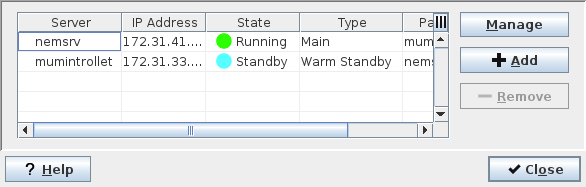
The Host Manager dialog allows you to create a list of FOXMAN‑UN servers. A FOXMAN‑UN server is a workstation which must have at least the FOXMAN‑UN core with the FOXMAN‑UN database installed.
In setups where server redundancy is required the main and standby servers are configured here.
In some cases there will only be one server, i.e. a single FOXMAN‑UN database. Large networks may be divided into several sections, each served by its own FOXMAN‑UN system.
Dialog image
Host Manager
Mandatory entries
None.
Optional entries
Not applicable.
Informational content
The list of previously defined FOXMAN‑UN servers:
Server | The NEM Server name. | |
IP Address | The NEM Server IP address. | |
State | The current state of the FOXMAN‑UN server. - Active: NEM services are running. - Standby: NEM services are ready to take over Active role in a Main/Standby setup. - Not running: NEM services are not running. | |
Type | The server redundancy setup type. “Standard” is a setup without redundancy. “Main / Warm Standby / Cold Standby” are setups supporting server redundancy. | |
Partner Server | The name of the partner NEM Server. | |
Controls (buttons, menu items, etc.)
Manage | Calls the NEM Remote Admin Tool for the selected server. You are prompted with the “Login to Server” dialog. You need to enter a valid Username and Password in order to successfully call the NEM Remote Admin Tool. | |
Add |  | Adds a FOXMAN‑UN server to the list of available servers via the “Edit Connection” dialog. |
Remove |  | Deletes the FOXMAN‑UN server that has been selected in the list of available servers. |
Close | Closes the dialog. | |
Login to Server
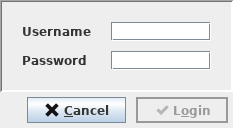
Username | Enter a valid username for managing the selected server. | |
Password | Enter a valid password for managing the selected server. | |
Edit Connection
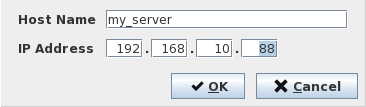
Host Name | Enter the NEM Server name. | |
IP Address | Enter the NEM Server IP address. | |
Related dialogs / windows