
Hardware View NE
Purpose
The NE hardware view provides a graphical presentation of a FOX51x NE subrack. It is the top level of the HW view hierarchy, the lower levels being Unit view and Subunit view.
The display provides details about the units in the subrack including their alarm state as well as information about the FOX51x NE itself.
Dialog image
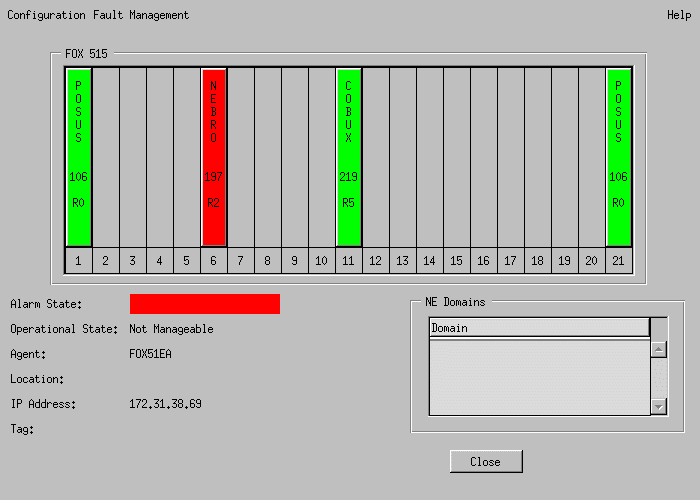
Shown here is the hardware view of a FOX515. The views of the other FOX51x types are identical except for the subrack frame and the address type (IP address or HDLC address).

Please note:
The FOX51x type is shown in the empty space at the upper left corner of the subrack frame.
NE_name
Mandatory entries
Not applicable.
Optional entries
Not applicable.
Informational content
NE subrack image | Each unit shows the color for the highest Severity of the currently active alarms within the unit. |
Alarm State | The color for the highest severity of the currently active alarms within the NE. |
Operational State | Manageable: Communication from FOXMAN‑UN to the NE is established. Unmanageable: Communication has been interrupted. Not configured: Communication was never established. Configuration could not be uploaded. |
Agent | The name of the agent controlling the management communication that this NE has been assigned to. |
Location | Text to indicate the physical site. It can only be entered or modified via the UCST “NE Configuration-Parameters” menu |
IP Address or HDLC Address | Address under which the NE can be reached by the agent. |
Tag | Text specified in the Create NE or NE Properties dialog, e.g. to describe the function of the NE. |
Domains | A list of all domains the NE has been made a member of. |
Controls (buttons, menu items, etc.)
Configuration > Modify NE… | Calls the configuration tool UCST for the NE shown in the hardware view. |
Fault Management > Alarm List… | Calls the alarm list filtered for the NE shown in the hardware view. |
Fault Management > Force Polling… | This forces an immediate polling of the NE shown in the hardware view to update the alarm status shown, even if the polling of this NE is turned off. |
Help > Help Viewer | Opens the FOXMAN‑UN help viewer and opens this page. |
Close | Closes this dialog. |
Related dialogs / windows