
Attached Pseudo Wires
Purpose
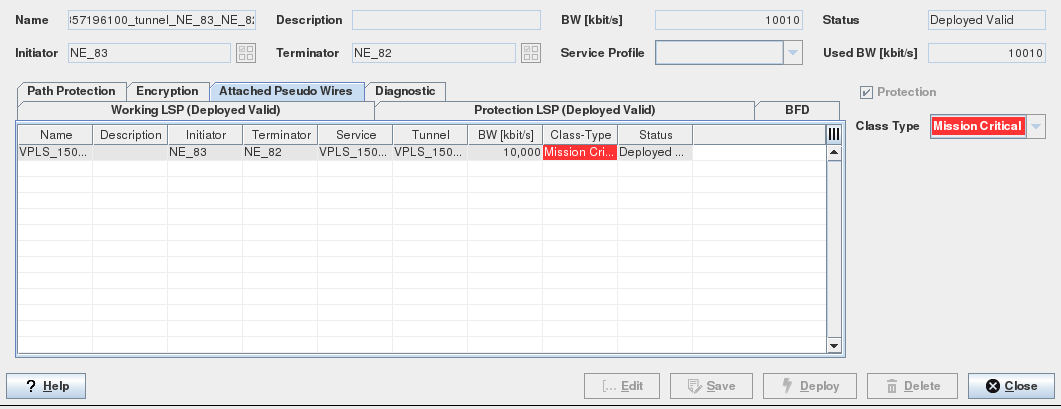
Displays all the Pseudo Wires attached to a tunnel.
Allows you to open the VPWS and VPLS dialogs in details view mode.
Dialog image
Tunnel – Attached Pseudo Wires
Mandatory entries
Not applicable.
Optional entries
Details Service
Informational content
Name | The specified Name of the Service. |
Description | The specified Description of the Service. |
Initiator | The ingress Label Edge Router (LER). |
Terminator | The egress LER. |
Service | The specified Service name. |
Tunnel | The specified tunnel name. |
BW [kbit/s] | The allocated Service bandwidth. |
Class Type | The assigned Class Type. |
Dual-Home Group | The assigned Dual-Home Group. |
Dual-Home Role | The assigned Dual-Home Role. |
Status | The Pseudo Wire status: - Deploying/Removing: Display the Progress bar Indicating the current progress of deploying or deleting the selected Service(s). - Deployed Valid: The Service (both Pseudo Wire endpoints) is deployed to the MPLS-TP nodes. - Deployed Invalid: One side of the Pseudo Wire is missing or was not correctly deployed. It is saved in the FOXMAN‑UN database and is deployed to the nodes. - Saved OK: The Service, Pseudo Wire are saved in the database but not yet deployed in the MPLS-TP nodes. |
Tunnel Status | The deployment status of the tunnel. For possible states see “Status” above. |
Admin State | The administrative state of the PW. |
Operation | During deployment, the transient operation state of the PW. |
Controls (buttons, menu items, etc.)
Service Context Menu
Details VPWS/VPLS |  | Calls the VPWS/VPLS dialog in view mode. From the Details view, the possible actions are: - Edit (applicable only to VPLS): Calls the Create Service Wizard. - Deploy: Deploys the Service to the nodes. - Delete: Deletes the Service. - Close: Closes the dialog. For details refer to the VPWS Details section. |
Details Service… | Open a dialog to show details of the service allocated to the PW. | |
Show Status Reason… | Opens a window with additional information on the most probable reason for an unaligned or invalid status if applicable to the selected item. | |
Admin State | - Up: Sets the administrative state of the Pseudo Wires used for this service to “up”. - Down: Sets the administrative state of the Pseudo Wires used for this service to “down”. |
Table Sorting and Filtering/Export and Printing
Please refer to Table Sorter section for details.
Related dialogs / windows