
Domain – Properties
Purpose
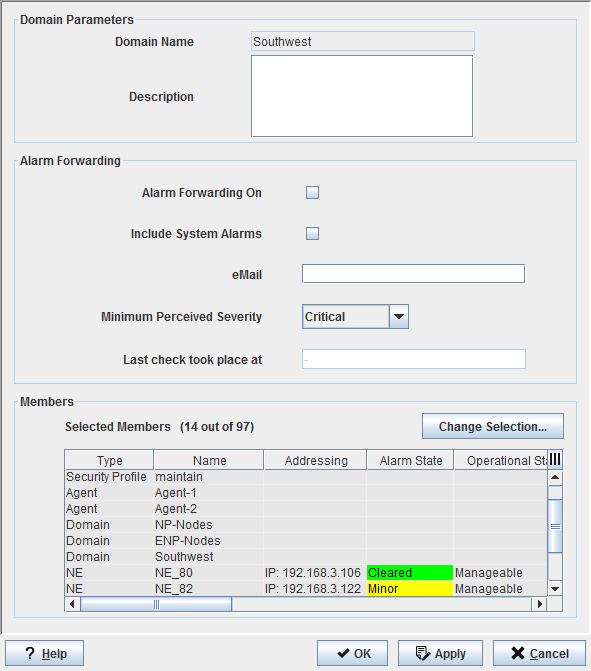
The Domain Properties dialog allows defining the members of the domain out of the complete set of existing elements (domains, agents, NEs, Foreign Objects, users, security profiles). Additionally, the description and the alarm forwarding parameters entered during the creation of the domain can be modified.
A domain and, as a consequence, its members, together with a Profile can then be assigned to a FOXMAN‑UN user. The user can then make use of the specified access rights of the profile to the members of the domain.
By default, the newly created and/or discovered NE(s) are automatically added as member(s) of the user’s domain.
Only a FOXMAN‑UN administrator can manually assign new members to the domain.
Dialog image
Domain Properties: <Domain_name>
Mandatory entries
The members of the domain must be defined.
Change Selection | Opens the “Domain – Choose Members” dialog to change (Add/Remove) selected members. |
Optional entries
Description | A text describing the purpose or special properties of the domain may be added. |
Enables the forwarding of alarm information for the NEs of this domain to the email address specified below, provided the global alarm forwarding is enabled in “File – Options” of the NEM Configurator. | |
Include System Alarms | Enables forwarding of system alarms. |
email | Specify a valid email address as target for the alarm information. |
Minimum Perceived Severity | Specify a severity. Alarms of the specified severity and higher will be forwarded, e.g. for “Major”, major and critical alarms will be included. |
Informational content
Selected Members | All currently assigned members of the domain. |
Controls (buttons, menu items, etc.)
? Help | Starts the FOXMAN‑UN help viewer and opens this page. |
OK | Applies the modifications and closes the dialog. |
Apply | Applies the modifications without closing the dialog. |
Cancel | Closes the dialog without applying the modifications. |
Related dialogs / windows