
Domain – Choose Members
Purpose
The “Select Members”, dialog allows the selection of elements (domains, agents, NEs, Foreign Objects, users, security profiles) as members of a domain.
Dialog image
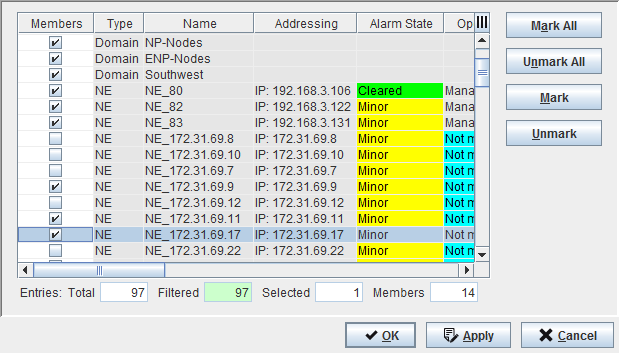
Mandatory entries
Members | Mark the element(s) as Member(s) of a domain. |
Optional entries
Not applicable.
Controls (buttons, menu items, etc.)
Mark All | Check mark/tick all the Members in the table. |
Unmark All | Clear all the check marks in the table. |
Mark | Check mark the selected Member(s) in the table. Note: - To select/highlight a single item from the table list: Click on a specific Member. - To select multiple items from the table list: Press “Ctrl key” then click on the required Members. - To select a range of items from the table list: Click on the first Member, Press “Shift key” then click on the last Member to be included in the range. |
Unmark | Clear the check mark(s) of the selected/highlighted Member(s) in the table. |
OK | Applies the modifications and closes the dialog. |
Apply | Applies the modifications without closing the dialog. |
Cancel | Closes the dialog without applying the modifications. |
Table Sorting and Filtering/Export and Printing
Please refer to Table Sorter section for details.
Related dialogs / windows