
System Alarms
Purpose
A number of alarms independent of the NEs are raised and displayed in the alarm lists by the FOXMAN‑UN system. Source can be the FOXMAN‑UN management communication (via the agents), the SNMP interface (if installed), the file system of the workstation (via the smtool) or the FOXMAN‑UN Networking Package (if installed).
The system alarms can be visualized on a map via a System Symbol, which is automatically created. The symbol shows system alarms via changing color and blinking, the same way as the NE symbols. The default name of the symbol is the name of the workstation that contains the FOXMAN‑UN core. This name can be modified. Several copies of the system symbol may be used, e.g. one on the main and one on every group map.
Identification
All system alarms are identified in the “Alarm Id” column of the Alarm List with the workstation name where the FOXMAN‑UN core is installed, plus a running number.
Generated alarms
Communication
“Communication Failure”

Please note:
This function must be enabled in the alarming.conf file under “Auto generation of communication lost alarms”. Default setting is “off”.
Alarm is raised when communication to an NE is lost. This alarm is cleared automatically when communication is restored. “Localization” shows name of the NE. Severity is “Critical”.
“Alarm Flooding”
Alarm is raised when polling is delayed due to the number of alarms being in excess of the configured limit. This alarm is cleared automatically when polling is resumed. “Localization” shows name of the NE. Severity is “Major”.
File System
“File system xx is over zz percent full”
Alarm is raised by the smtool when a specified partition reaches the configured threshold. Default configuration in the smtool.conf contains the partitions “/” with 90% and “/opt” with 90%. Default severity is “Minor”. These alarms can only be cleared by the operator.
“File system xx does not exist”
Alarm is raised by the smtool if a file system specified in the smtool.conf under “File systems to check” does not exist. Severity is “Minor”. This alarm can only be cleared by the operator.
Database synchronization
“Database Synchronization Problem”
Alarm is raised for a specific NE if an incoming unit alarm cannot be resolved because the corresponding configuration data is missing in the database. This can happen if the configuration of an NE is changed via a local terminal causing new alarms, and the database has not been updated yet.
To solve the problem, first clear the system alarm (can only be done by the operator), then force a polling of the relevant NE and check that the system alarm is not raised again.
Alarm Count
“Overload”
This alarm can only be raised on starting up the FOXMAN‑UN system. It indicates that there may be too many alarms in the database and that hence the system performance might be poor. This alarm can only be cleared by the operator.
Clear the “Overload” alarm, acknowledge all cleared alarms and then stop and restart the FOXMAN‑UN system. If the “Overload” alarm reappears, make note of the number of active alarms (use “Fault Management > Alarm Summary (Global)” in the NEM Configurator) and contact our technical support.
“NE Register For Notifications Failure”
Alarm is raised if an NE is not registered for notifications. It indicates that an NE is not sending alarm notifications, or notifications are not received by FOXMAN‑UN, possibly because there is no valid route from the NE to the FOXMAN‑UN server, or the port used is inappropriate.
“NE Notifications Missed”
Alarm is raised if notifications from an NE are not received in a consecutive order, or the NE is sending an indication that it cannot send all notifications, e.g. due to overload of the NE.
Configuration Upload
“Automatic Configuration Upload Performed”
Alarm is raised for any NE individually on termination of a configuration upload. This happens immediately after an NE is created or after the configuration of an NE has been modified locally (not through FOXMAN‑UN), e.g. via the FOXCST. This alarm can only be cleared by the operator.
SNMP
“No SNMP daemon was found”
The alarm is raised by the smtool if the SNMP daemon is not active. Default setting in the smtool.conf for this check is disabled, default severity is “Warning”. This alarm can only be cleared by the operator.
Networking Package
The Networking Package can raise approximately 20 different alarms. Please refer to the User Manual “Networking Package” for a list. All these alarms can only be cleared by the operator.
Service Supervision
Service Supervision can raise service alarms “Partial Service Loss” and “Total Service Loss” if the service availability falls below the threshold configured. This alarm is cleared if the service quality and/or availability exceeds the required threshold again.
Clearing of system alarms
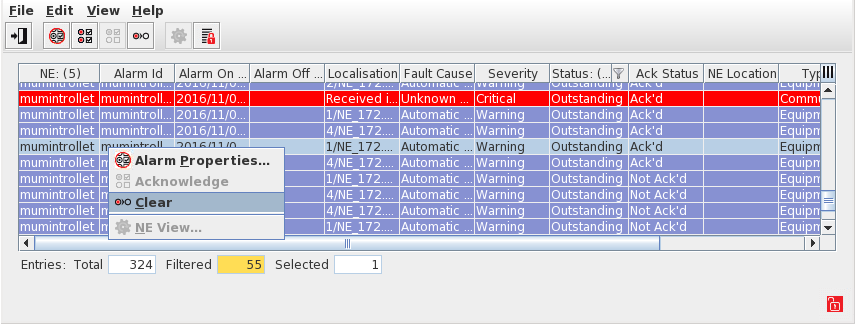
Clearing of system alarms has to be done either via the context menu or via the corresponding icon in the alarm list: Select one or more system alarms and call the context menu. The item “Clear Alarms” will be enabled.
Please note:
Also the system alarms that are cleared automatically (“Communication lost” and “Alarm flooding”) can be cleared prematurely via this menu.
Related dialogs / windows
Alarm List dialog.