
Domain – Create
Purpose
The Create Domain dialog adds an empty domain to the existing ones and sets its alarm forwarding parameters. After the domain is created, it has to be populated using the Domain – Properties dialog.
Dialog image
Create Domain
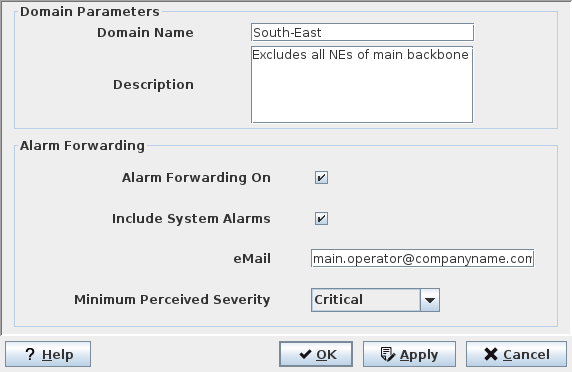
Mandatory entries
Domain name | This name cannot be modified once the domain has been created. If it needs to be changed, the domain has to be deleted and recreated. |
Optional entries
Description | A text describing the purpose or special properties of the domain may be added. |
Enables the forwarding of alarm information for the NEs of this domain to the email address specified below, provided the global alarm forwarding is enabled in “File – Options” of the NEM Configurator. | |
Include System Alarms | Enables forwarding of FOXMAN‑UN system related alarms. |
email | Specify a valid email address as target for the alarm information. |
Minimum Perceived Severity | Specify a severity. Alarms of the specified severity and higher will be forwarded, e.g. for “Major”, major and critical alarms will be included. |
Informational content
Not applicable.
Controls (buttons, menu items, etc.)
? Help | Starts the FOXMAN‑UN help viewer and opens this page. |
OK | Applies the modifications and closes the dialog. |
Apply | Applies the modifications without closing the dialog. |
Cancel | Closes the dialog without applying the modifications. |
Related dialogs / windows
Domain – Properties dialog.