
Alarm Summary
Purpose
The Alarm Summary dialog dynamically displays the current FOXMAN‑UN user network’s total number (counter) of currently active alarms according to their Severity: Critical, Major, Warning, or Indeterminate.
A cleared alarm is taken off its severity counter and added to the Cleared Alarms counter for as long as it has not been acknowledged. On acknowledgment it is taken off the Cleared Alarms counter and then moved from the FOXMAN‑UN database to the Alarm History.

Please note:
An Alarm Summary belongs either to the FOXMAN‑UN user’s entire network or to a map. For a map it shows only the alarms of the symbols (NEs, FOs, and System) contained in the current map.
The alarm summary can be displayed in three different configurations:
− Expanded version. This is a full width display showing the summary of the FOXMAN‑UN user’s complete managed network at the top and a list of all its maps with their summaries below.
− Reduced version. The dialog can be reduced to just the global summary, or a map can be selected in the list and the dialog can be reduced to just the summary of that map.
− Compressed version. The dialog can also be shrunk to help reduce desktop clutter. The reduced version does not show the severity names, it only shows the severity colors.
Any unacknowledged alarm of a severity is indicated by blinking of the respective counter and its color field. As soon as all alarms of the severity have been acknowledged, the blinking is turned off. The severity threshold for the blinking as well as an audible indication can be configured via the Alarm Summary Options dialog. Furthermore the blink frequency can be customized in the FOXMAN‑UN configuration (alarming.conf file).
An Alarm List filtered for any severity can be called by double clicking on the colored counter field of any severity.
Dialog images
Alarm Summary – Full view

Alarm Summary – Compressed view
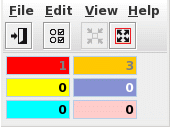
Mandatory entries
Not applicable.
Optional entries
Not applicable.
Informational content
The title bar of the Alarm summary dialog shows either global or the name of the map for which the main summary at the top is given.
Alarm counters | They show the number of active alarms per severity of all NEs and FOs in a map or in the entire network of the FOXMAN‑UN User. |
Acknowledgment status | The counter and its color field are blinking if there is at least one alarm not acknowledged. This applies also to cleared alarms. |
Controls (buttons, menu items, etc.)
Severity fields | Double click on the colored fields of the severities opens an Alarm List dialog with the filter set for the corresponding severity. |
Menu “File”
File – Exit |  | Closes the current dialog window. |
Menu “Edit”
Acknowledge All Cleared |  | Acknowledges all cleared alarms and moves them from the alarm list to the alarm history. |
Acknowledge Cleared of Selected Map | Acknowledges cleared alarms of selected map and moves them from the alarm list to the alarm history. | |
Allows modification of the flash and audible alarm parameters. |
Menu “View”
Alarm Summary of Selected Map | Reduces the dialog to the Alarm Summary of the selected map. | |
Alarm List of Selected Map | Displays the alarm list of the selected map’s member NEs | |
Shrink |  | Shrinks the dialog to the next smaller display version. |
Expand |  | Expands the dialog to the next bigger display version. |
Menu “Help”
? Help | Starts the FOXMAN‑UN help viewer and opens this page. |
Table Sorting and Filtering/Export and Printing
Please refer to Table Sorter section for details.
Related dialogs / windows