
Alarm Summary Options
Purpose
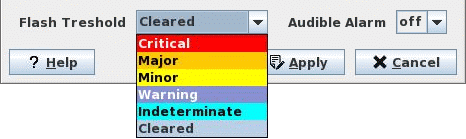
The Alarm Summary Options dialog is used to set the Severity threshold at which the presence of unacknowledged alarms in the communications network managed by the FOXMAN‑UN is indicated by flashing of the alarm counters and colored fields in the Alarm Summary dialog.
It also allows turning on and off the audible alarm which uses the same severity threshold as the flashing.

Please note:
The filter configuration is only valid till the NEM Browser is closed. Then the default setting is resumed (all counters flashing, no audible alarm).
Dialog image
Alarm Summary Options
Mandatory entries
Not applicable.
Optional entries
Not applicable.
Informational content
Colored toggle | Identifies each Severity by its color. |
Acknowledgment status | One or more unacknowledged alarms cause the respective color field to flash |
Controls (buttons, menu items, etc.)
Flash Threshold | Activates the flashing for unacknowledged alarms up to and including the selected severity. Default setting is the severity Off. |
Audible Alarm | Turns on the audible alarm for unacknowledged alarms up to and including the severity selected for flashing. Default setting is Off. |
? Help | Starts the FOXMAN‑UN help viewer and opens this page. |
OK | Applies the modifications and closes the dialog. |
Apply | Applies the modifications without closing the dialog. |
Cancel | Closes the dialog without applying the modifications. |
Related dialogs / windows
Alarm Summary dialog.