
Alarm Customisation – FOX51x Unit/Subunit
Purpose
The Alarm Customisation dialog for FOX51x units and subunits is used to modify the default Fault Cause text, the default Severity, and the Intermittent Alarm setting of individual alarms. The dialog is called from the Hardware View Unit or the Hardware View Subunit.
The purpose and the actions performed here are identical to those of the global Alarm Customisation dialog, except that modifications are only valid for a single unit or subunit of the connected NE (or FOX51x).

Please note:
Modifications made for a unit or subunit overrule the ones made in the global alarm customisation.
Dialog image
<NE_name>
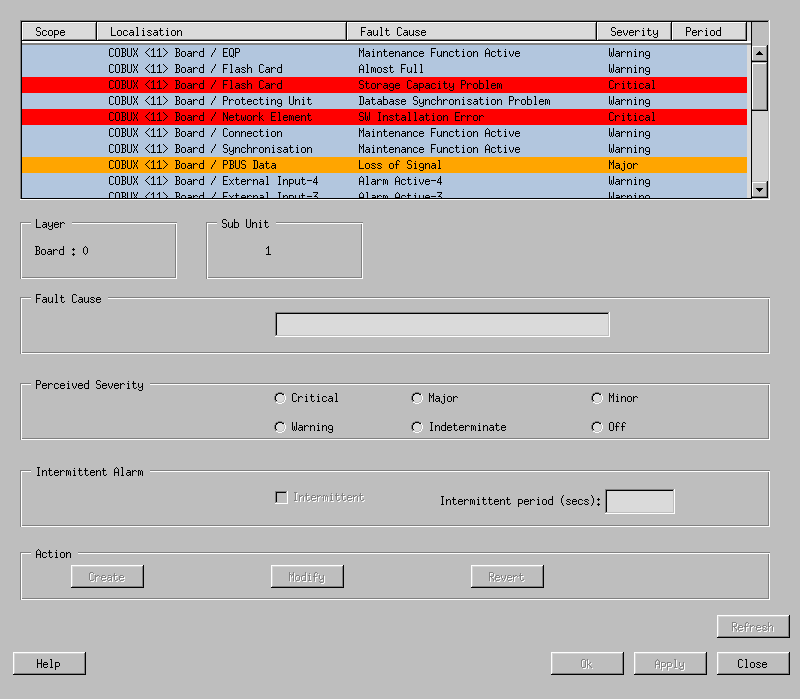
Mandatory entries
Before modifications can be entered, the desired alarm has to be selected in the list.
To make finding a particular alarm easier, the list can be sorted in ascending or descending order for each column by clicking on its header.
Hint:
For finding all modified alarms sort the Scope column.
Optional entries
Modify all | This toggle is shown for all layers except the Board layer. It causes modifications to be applied to all subunits of that particular layer. |
Fault Cause | The default text can be modified to a more suitable one if required. Maximum length is 50 characters. |
Perceived Severity | The default Severity can be increased or lowered. If set to Off, the alarm is either not generated any more (default in the FOXMAN‑UN configuration), or it is treated as a sixth severity with the color green. |
Intermittent Alarm | Multiple occurrences of the same alarm can be limited to a single report per a specified time period. This is in addition to the persistence filtering applied in the FOX51x (default 2.5 seconds). |
Intermittent Period | The shortest period in seconds after which an alarm can be reported a further time. Maximum value is 86400 seconds (24 hours). Note: If the period is set to zero, the alarm will not be generated any more. |
Informational content
Alarm list | All alarms belonging to the selected layer are shown. The column Scope is empty for unmodified alarms, or shows Units for modified alarms. The list can be sorted in ascending or descending order for each column by clicking on the column header. |
Layer / Subunit | The layer name (the name on the tab, e.g. Board, E12/P12) and number as well as the subunit number from where the dialog was called. The layer number for Board is always 0. |
Controls (buttons, menu items, etc.)
Create | The changes to the criteria of the selected alarm are entered into the list. They will be saved to the FOXMAN‑UN database when using the Apply or the OK button. |
Modify | Active if an already customized alarm in the list is selected. Enters subsequent changes of criteria into the list. |
Revert | Active if an already customized alarm is selected in the list. Sets the criteria back to their default values. |
Refresh | Brings the list of alarms up to date after adding, deleting or reconfiguring NEs. |
Help | Starts the FOXMAN‑UN help viewer and opens this page. |
OK | Applies the modifications and closes the dialog. |
Apply | Applies the modifications without closing the dialog. |
Close | Closes the dialog without applying the modifications. |
Related dialogs / windows