
Sync Map – Timing Sources Status
Purpose
Displays the timing source status of the selected node. Contrary to the same dialog called via the CST GUI, the entries cannot be edited. This dialog is called from the Synchronization Map dialog via the menu “Edit - Open Timing Sources Status...”.
The status contains the following:
− Source,
− Priority,
− Quality,
− Status,

Please note:
For details of the synchronization aspects and configuration details at system level, please refer to the following related technical documents:
• User Manual “TDM Services and Cross Connections in FOX61x”,
• User Guide “FOX51x Synchronization”.
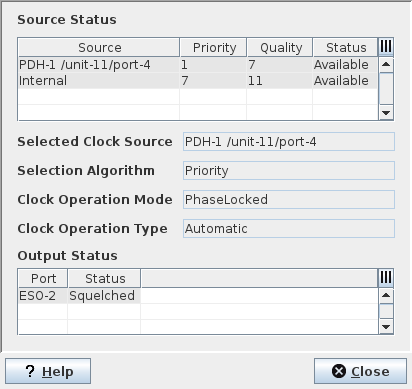
Dialog image
Timing Sources Status: PDH/SDH <NE_Name>
Mandatory entries
Not applicable.
Optional entries
Not applicable.
Informational content
Source Status
Reflects the status of the PETS or SETS timing sources of the selected node. Contrary to the dialogs called directly from the CST GUI, no modifications are possible.
Source (PDH Nodes) | List the available PETS clock sources for the selected PDH node. A PDH network element requires a Plesiochronous Equipment Timing Source (PETS) traceable to a Primary Reference Clock (PRC). The PRC timing is fed to the FOX61x NE via any of the following: External synchronization clock inputs (ESI-1 and ESI-2) of the control unit; PDH-1 to 4 (PDH Clock Source 1 to 4), which can be any of the following: - Ethernet Ports 1 to 5 of the control unit, - E1 ports of on the 2 Mbit unit, - SHDSL span on the SHDSL unit (SHDSL NT clock, NT payload clock, or LT clock), - SETS on the SDH units, - PDH P12 clock signal on the SDH units. The PETS can likewise use one of the following internal clock sources: - Internal clock oscillator of the control unit, - SETS on the SDH unit (configured to internal). |
Source (SDH Nodes) | List the available SETS clock sources for the selected SDH node. All SDH ports and SDH processing on an SDH service unit are synchronized to the synchronous equipment timing source (SETS). Each SDH service unit provides one SETS that is used for the unit. It is possible to synchronize the SETS functions of several SDH service units to one common clock source. The SETS synchronization signal can be derived from any of the following: - Up to four SDH Interfaces of the SDH service unit, - PDH- 1 to 4 (PDH Clock Source 1 to 4), - External synchronization clock inputs (ESI-1 and ESI-2) of the control unit. |
Priority | The configured Priority for the timing source. - Disable: The clock is not available. - 1…10: The clock source is available. Note that “1” is the highest priority. The PETS clock source can have priority between 1 and 7. The SETS clock source can have priority between 1 and 10. |
Quality | The received or configured Quality Level (QL) of the timing source. If the Selection Algorithm is set to “Quality”, the SETS and PETS system considers the clock sources’ received or configured Quality Levels for the selection of their reference timing source. The signal with the highest level of quality (QL= lowest number) is selected. The following values are defined: QL=0: Quality unknown, QL=2: ITU-T G.811, QL=4: ITU-T G.812 (SSU-A), QL=8: ITU-T G.812 (SSU-B), QL=11: ITU-T G.813 Option I (SEC), QL=15: Do not use for synchronization. |
Status | - Available: The clock source can be used as reference timing source. - Failed: Received or configured QL=15 (Do not use for synchronization). - Not Supervised: The timing source Priority is set to Disabled. |
Selected Clock Source
Displays the currently selected reference timing source.
Selection Algorithm
From the available clock sources, the PETS/SETS automatically selects the reference timing source with the best quality. Two basic selection modes for system synchronization are provided: Priority based and Quality Level (QL) based
Priority | The selection process is controlled by the configured Priorities assigned to the clock sources. The signal with the highest priority (lowest number) is selected. It disregards the sources’ quality levels (QLs). |
Quality | The selection process considers the clock sources’ received or configured Quality Levels. The signal with the highest level of quality (lowest number) is selected. If two timing sources provide the same QL, the timing system selects the timing source with higher priority. |
Clock Operation Mode
Locked | Normal operation mode. The output SETS/PETS clock signal is controlled by an external input reference so they have long term average frequency. |
Holdover | The PETS/SETS is running with previously stored clock data. The following conditions can bring operation mode to Holdover: - If the Clock Operation Type is set via CST to “Auto Selection or Automatic” and if the clock reference fails, SETS/PETS continues operating in holdover mode. - If the Clock Operation Type is set via CST to “Forced Holdover”. |
FreeRunning | The PETS/SETS is synchronized to the internal clock oscillator. This status is likewise shown if the Clock Operation type is set via CST to “Forced Free Running”. |
Clock Operation Type
Auto Selection Mode /Automatic | The Clock Operation Type is set to “Auto Selection” via CST. The SETS/PETS selects its Clock Operation Mode (Locked, Holdover or FreeRunning) by itself, depending on the conditions given by the availability of synchronization sources. |
ForcedFreeRun/ForcedFree | The Clock Operation Type is set to “Forced Free Running/Forced Free Run” via CST, which brings the Clock Operation Mode to “FreeRunning”: |
ForcedHoldover | The Clock Operation Type is set to “Forced Holdover” via CST, which brings the Clock Operation mode to “Holdover”: |
Output Status
Displays the current status of the External Synchronization Output (ESO) interfaces. The ESO timing signal (leaving the NE) can be used for the synchronization of external elements, e.g. another FOX61x or FOX51x NE.
Port | Refers to the ESO interfaces available in the control unit: FOX51x: - ESO-1…3/PDH, - ESO-4/SDH. FOX61x: - ESO-1/PDH, - ESO-2/SDH. |
Status | - Active: The timing signal can be used for synchronization purposes. - Squelched: The timing signal is suppressed and cannot be used for synchronization purposes. |
Controls (buttons, menu items, etc.)
Table Sorting and Filtering / Export and Printing
Please refer to Table Sorter section for details
? Help | Calls the FOXMAN‑UN help viewer and opens this page. |
Close | Closes the dialog. |
Related dialogs / windows