
Report Manager
Purpose
The Report Manager dialog is called from the Service Supervision Service Supervision via the menu selection “Tools – Manage Report Profile…”.
Allows the creation of Service Report Profile to:
− Schedule report creations
− Send generated reports to an email or save in a local directory.
Dialog image
Report Manager
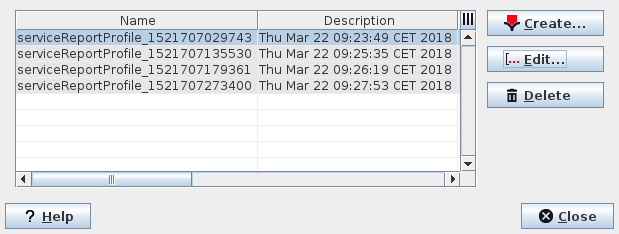
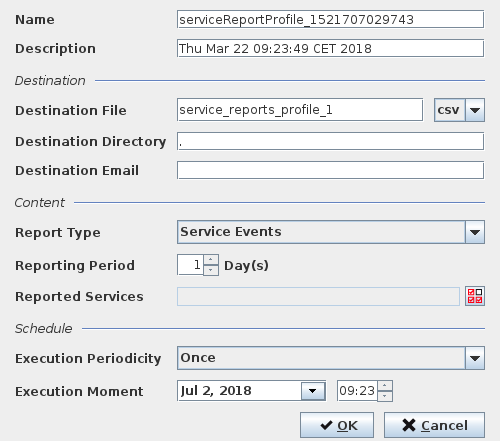
Report Profile Editor
Informational content
List the Reports Profile showing the report type (Service, Daily Statistics Count 1, etc.), the Schedule of the report generation and the Destination of the generated report(s).
Controls (buttons, menu items, etc.)
Report Manager
Create… |  | Calls Report Profile Editor to create new Profile. |
Edit… |  | Calls the Report Profile Editor dialog to edit values of the currently selected Profile. |
Delete |  | Deletes the selected Profile(s). |
? Help | Calls the help viewer and opens this page. | |
Close | Closes the dialog. |
Table Sorting and Filtering
Please refer to Table Sorter section for details.
Report Profile Editor
Name | Enter a name for the Report Profile. |
Description | Enter a description for the Report Profile. |
Destination File | Specify a file name and file type (csv or pdf). |
Destination Directory | Specify a local directory where to save the generated report(s). |
Destination Email | Specify the email address(es) where to send the generated report(s). |
Report Type | Select the content of the report(s) to be generated: - Service Events, - Daily Failure Count 1, - Daily Failure Count 2, - Monthly Availability. |
Reporting Period | The time period covered by the report, e.g. the Monthly Availability data for 3 months. |
Reported Services | Select the service(s) to be included in the Report. |
Execution Periodicity/Execution Moment | Define the report schedule: - “Once”, or date and time of execution: - Daily/Time of execution, - Weekly/Day of execution, - Monthly/Day of the month of execution. |
OK | Creates the Report Profile and exits the dialog. |
Cancel | Exits the dialog without creating the Report Profile. |
Related dialogs/windows
Service Supervision Service Supervision.